Free Shipping on Shopify: How to Set It Up and How to Pay for It
Two ways to switch on free shipping in Shopify (a rate or a discount), how to limit it by product, zone and market, and how to decide who pays: price, threshold, region or the first order.

You can offer free shipping on Shopify in two ways: a free shipping rate in your shipping settings, or a free shipping discount (automatic or with a code). The hard part is deciding who pays for it, so most of this guide is about that: the arithmetic, the four ways to cover the cost, and the delivery, duty and checkout details that go wrong after launch.
Every number in the worked example below is a placeholder to show the maths. It is not data from any store.
Two ways to switch on free shipping
Shopify's own guide to free shipping says merchants can offer it through shipping rates or through discounts. They do slightly different jobs.
| Option | Free shipping rate | Automatic free shipping discount | Free shipping discount code |
|---|---|---|---|
| Where you set it | Settings, Shipping and delivery, inside a shipping profile | Discounts, free shipping, automatic | Discounts, free shipping, discount code |
| Customer action | None | None | Must type the code |
| Conditions Shopify's guide lists | Order price or weight | Minimum purchase or quantity, customer segment, destination, usage conditions, dates | Same as automatic |
| Best for | A permanent, simple rule such as free over a set order value | Promotions and rules with extra conditions | Email, partner or influencer campaigns where you want to control who gets it |
| Watch out for | Two standard options showing at once above the threshold (test it) | Combining with other discounts | Codes leaking to coupon sites |
The conditions in that table come from Shopify's guide and from the developer reference for the free shipping discount. The reference is for apps, but it shows what the discount type can do underneath the admin screens.
Option 1: a free shipping rate
Shopify's guide describes the path like this: go to Settings, then Shipping and delivery, pick the shipping profile, add a shipping option, name it, set the rate type to flat, and set the price to 0. You can then add a condition based on order price or weight, so the free rate only appears for larger or lighter orders.
Two practical points:
- We did not find this covered in Shopify's pages: if you keep a paid standard rate next to the free one, check in a test checkout that only one standard option shows above the threshold.
- A weight condition is a cheap way to keep free shipping for light parcels only.
Option 2: a free shipping discount
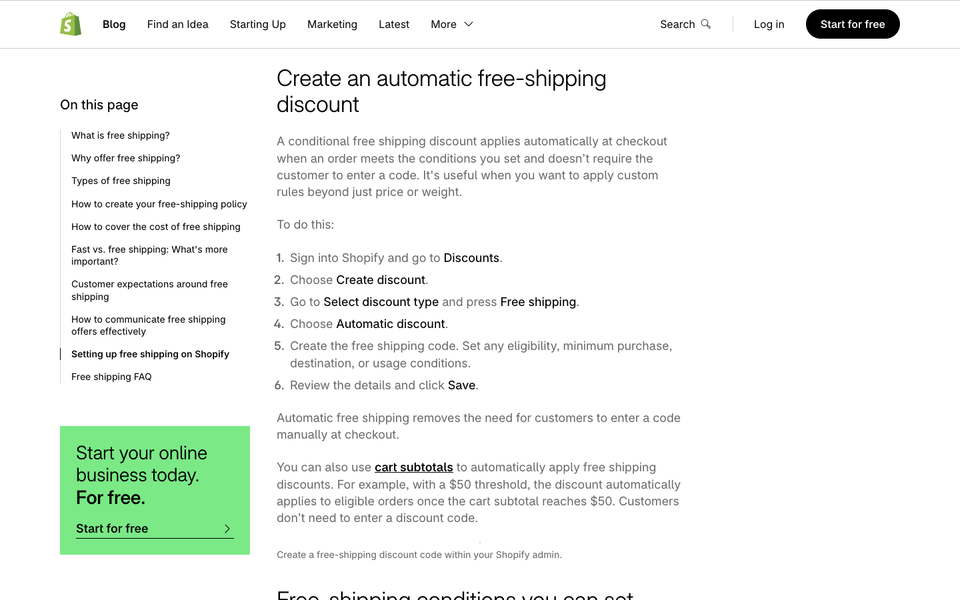
Shopify's guide describes the admin steps: Discounts, Create discount, Free shipping, then choose "Discount code" or "Automatic discount", set the conditions and save. Automatic means the customer never has to enter anything.
From the developer reference, a free shipping discount can be limited by:
- a minimum subtotal or a minimum quantity of items
- destination countries
- who can use it: all buyers, customer segments, specific customers or specific markets
- one-time purchases, subscriptions, or both, and for subscriptions how many billing cycles it lasts
- a start and end date
- a cap on the shipping price that qualifies (the API calls it
maximumShippingPrice) - which other discount types it can combine with (the API default is that it does not combine with product or order discounts)
We only confirmed the shipping price cap and the combination default in the developer reference, not in the admin screens, so look for the matching settings in your admin before you rely on them. We also did not find a page that says whether the minimum subtotal counts before or after other discounts. Test it with a real cart and a discount code.
Limit it by product, zone and market
Free for everyone, on everything, everywhere is the most expensive version. Shopify gives you several ways to narrow it.
By product, with shipping profiles. A delivery profile decides which products ship from which locations to which zones, and at what rates. The default profile covers every product not assigned to another profile. So you can put heavy, bulky or low-margin items in their own profile with its own rates and leave them out of the free offer. Shopify's guide gives examples of stores that exclude whole product groups from free shipping.
By zone. A zone is a group of countries with the same shipping rates. Customers can only order to a destination that sits inside one of your zones. Put your home country in one zone with a free rate and put the rest of the world in another zone with paid rates.
By country in a discount. The free shipping discount has its own list of destination countries, which is useful when you run free shipping as a promotion in one country only.
By market or customer. The developer reference lets a free shipping discount target specific markets or customer segments. Shopify's guide mentions first-time customers (the "customers who haven't purchased" segment) and paid members as typical groups.
By subscription. A discount can be set to apply to one-time purchases, subscriptions or both. Delivery profiles can also be tied to subscription selling plans, so a subscription can have its own shipping rules, such as free shipping.
Free shipping bars: theme or app
A free shipping bar ("You are 25 away from free shipping") does not change what the customer pays. It only shows a message. The real rule still lives in your shipping rate or discount. That split causes the most common bug: the bar says 75, the discount says 80.
You can build a basic bar in your theme. This Liquid snippet uses cart.total_price, which Shopify documents as the total price of the items in the cart, in the customer's local currency and the currency's smallest unit, after discounts have been applied. We did not confirm how cart-level discount codes affect it. We did not run this code on a store.
{% assign threshold = 7500 %}
{% assign remaining = threshold | minus: cart.total_price %}
{% if remaining > 0 %}
  You are {{ remaining | money }} away from free shipping.
{% else %}
  Your order qualifies for free shipping.
{% endif %}
Three catches. The number 7500 means 75.00 in a currency with two decimals, so it is wrong the moment a shopper sees prices in another currency. It is hard-coded, so someone has to change it in two places when you change the offer. And the bar and your real rule can count different things, so test them with a discount code in the cart. If you sell in several currencies or markets, use an app that follows your rule, or ask a developer to read the threshold from one setting.
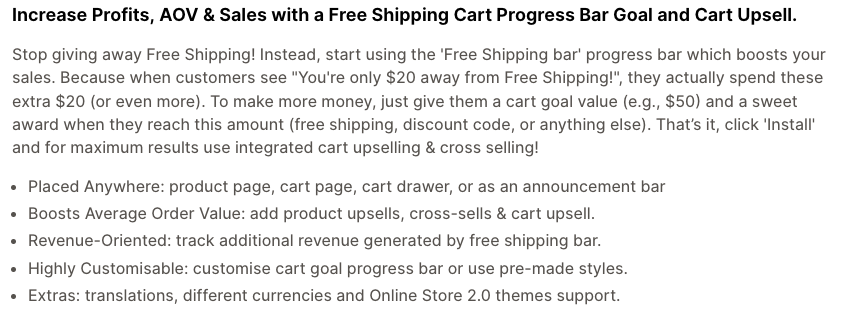
We opened the listings for three apps: Essential Free Shipping Bar, FSB: Free Shipping Bar and X Away From Free Shipping. We have not installed any of them.
| App | What the listing says | Pick this if | Skip this if |
|---|---|---|---|
| Essential Free Shipping Bar | Bar on product page, cart page, cart drawer or announcement bar; cart upsell options; free plan available | You want one tool for the bar and basic cart upsells | You only need a one-line message (the theme snippet above does that) |
| FSB: Free Shipping Bar | Progress bar; the description mentions targeting by location, Shopify Markets and customer (country and customer targeting sit under the paid plan); the free plan lists an automatic free shipping discount | You want the bar and the discount created together | You are wary of a very new app: the listing shows a 2026 launch and it asks for permission to edit discounts |
| X Away From Free Shipping | Message and progress bar shown when the order total is under your threshold, set up in the theme editor; the listing describes it as a checkout page bar | You want the message close to checkout | You need different thresholds per country: the listing does not mention it |
Before you install any bar app, check four things: does it read your real rule or keep its own number, does it handle multiple currencies, does it ask to edit discounts (and why), and what does it do to page speed. Remove it if the numbers ever disagree with checkout.
How to pay for free shipping
Free shipping is not free. The carrier still charges you. Shopify's guide says the same: the business pays the carrier, or builds the cost into the price. The decision is which of four places the cost lands.
A worked example (placeholder numbers)
Take an order of 60 where the goods cost 36 to buy or make, so the margin is 24 (40%). Shipping costs you 8 nearby and 25 in a far zone.
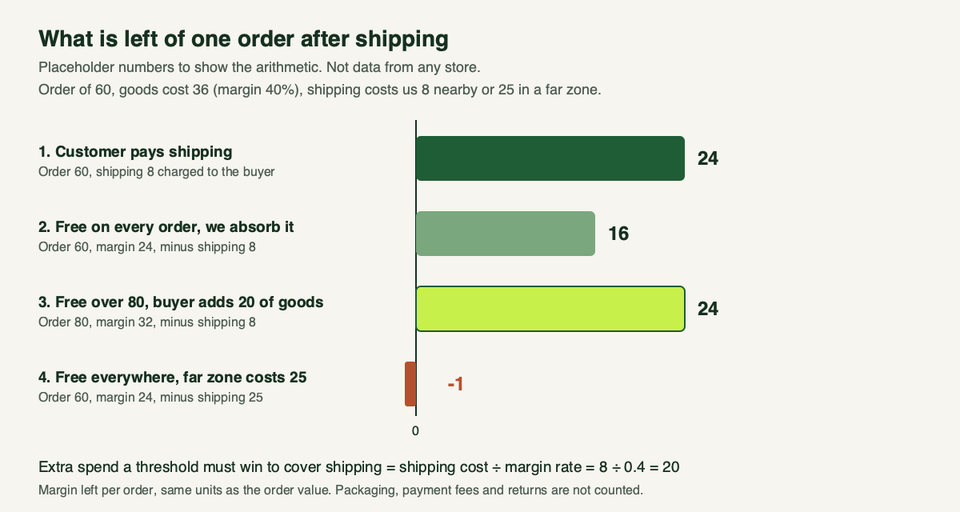
- If the customer pays the 8, you keep the full 24.
- If you absorb the 8 on every order, you keep 16. A third of the margin is gone.
- If you set the free threshold at 80 and the customer adds 20 of goods, the order is 80, the margin is 32, and after shipping you keep 24. You are back where you started.
- If you offer free shipping everywhere and a far-zone parcel costs 25, you keep -1. You paid to make the sale.
The rule behind the third line: the extra spend a threshold must win to cover shipping is the shipping cost divided by your margin rate. Here that is 8 ÷ 0.4 = 20. At a 25% margin the same shipping cost needs 32 of extra goods. Shopify's guide walks through a similar calculation: in its example, 5 of extra spend adds about 2 of gross profit and still leaves 6 of an 8 shipping cost uncovered.
The example leaves out packaging, payment fees and returns. Add yours before you decide.
The four ways to cover the cost
| Approach | How it works | Pick this if | Skip this if |
|---|---|---|---|
| Build it into the price | Raise prices so that shipping is paid for on every order | Parcels cost about the same everywhere and your customers compare final price | Your shipping cost varies a lot by zone, or you advertise low prices |
| Minimum order threshold | Free over a set basket value | Shoppers can easily add a second item and you sell at a healthy margin | Most of your orders are already above the threshold |
| Limit to regions or products | Free only in zones, markets or profiles where the cost is low | Your home zone is cheap and abroad is expensive | You want one simple message for every visitor |
| Absorb on the first order | Free for new customers only, paid or tiered afterwards | A first order often leads to repeat orders and you can wait for the payback | Customers rarely come back, so you only ever pay |
Build it into the price. On the placeholder order, a shipping cost of 8 is about 13% of the 60. Spreading it across prices makes every product look dearer on collection pages, in ads and in price comparisons, including for customers whose parcel costs you far less. It is the easiest to explain ("free delivery, always") and the hardest to undo.
Minimum threshold. Shopify's worked example proposes a minimum just above the average order value and then tests it. Remember the hidden cost: customers already above the line used to pay for shipping, and now they do not. If most orders are already above your threshold, you have mostly given away shipping revenue. To raise basket size toward the line, see our roundup of upsell apps for Shopify.
Region or product limits. Use shipping zones and profiles (above). Keep the message honest on the product page: "Free delivery to mainland UK" is better than a global banner with small print.
Absorb on the first order. Use an automatic or code discount limited to the "customers who haven't purchased" segment. Count the shipping as part of the cost of winning a customer. On the placeholder order, the first sale leaves 16 of margin instead of 24, which is fine if the customer comes back and a problem if they do not.
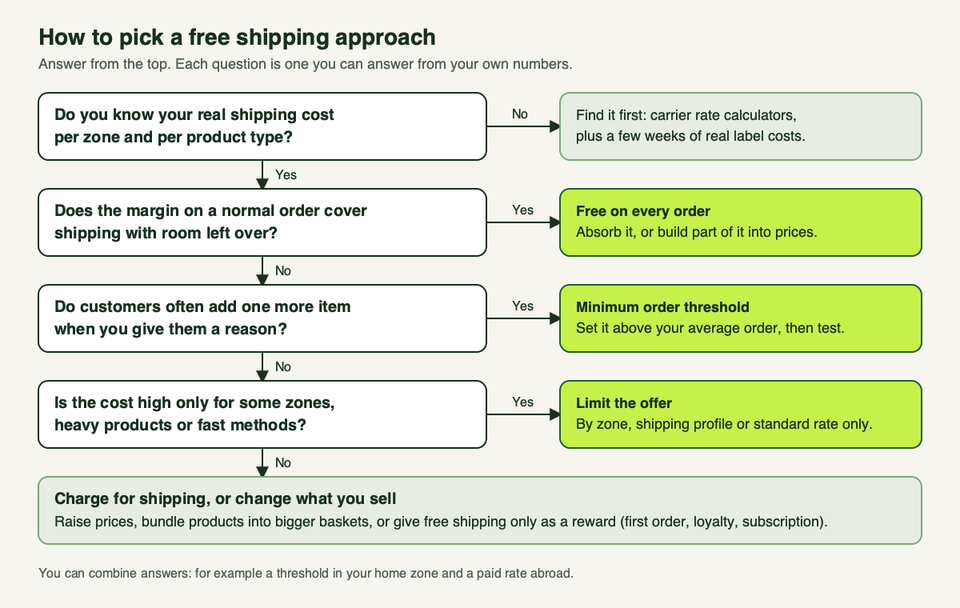
Before any of this, find your real shipping cost per zone. Shopify's guide points to the carrier rate calculators and says to use average cost per order rather than a guess.
Delivery promises
Free shipping often arrives with a slower service level, and shoppers read "free" as "free and fast" unless you say otherwise.
- Say how long both parts take: the time to dispatch and the time in transit. Put the promise next to the free shipping message, not only in the policy page.
- Make the free service slower than the paid fast one, and say so in the delivery option name.
- In the US, Shopify's guide says the FTC's Mail, Internet, or Telephone Order Merchandise Rule requires a reasonable basis for any shipping time you state, and that without a stated time you generally need a reasonable basis to ship within 30 days. If a delay hits, it says you must tell the customer and offer a cancel option. Read the rule itself or ask a lawyer before you build a promise on it.
- For UK distance sales, the government's distance selling guidance says you must give customers information on delivery arrangements, costs and how long goods will take, and deliver within 30 days unless you agreed otherwise.
If you dropship, your supplier's dispatch time is part of the promise too, so read our dropshipping apps guide before you quote a delivery window. If you take pre-orders or sell made-to-order goods, a free shipping banner can hide long waits. Our guide to Shopify pre-order apps covers ship-date rules for those.
International orders: duties are not shipping
Free shipping covers the carrier's delivery charge. It does not cover import duties and taxes on international orders. Shopify's duties and tariffs guide describes two models:
- Delivered at Place (DAP): the customer pays duties and taxes on delivery. It costs you nothing upfront but can cause surprise fees and delays.
- Delivered Duty Paid (DDP): duties and taxes are calculated and collected at checkout.
To collect at checkout, Shopify says to turn it on under Settings, Taxes and duties, add a country of origin and a Harmonized System (HS) code to your products, and then buy DDP shipping labels for those orders. Shopify says to use DDP labels instead of DAP labels so the customer is not charged twice. You can show duties as a separate line at checkout, or use duty-inclusive pricing and say so. Shopify also lists a fee for orders where duties are calculated at checkout, so check its current page for the rate. Eligible US merchants can look at Managed Markets, which Shopify says guarantees the amount of duties and import tax collected.
Shopify's tariff guide of 24 February 2026 describes US tariff changes that took effect that month. Rules like these move, so check the current position before you make a duty promise.
What this means for free shipping abroad: either set a higher threshold for international zones, charge a paid rate there, or decide in advance whether "free" includes duties. Whichever you choose, say it in plain words in the shipping policy and the checkout message.
What shoppers see at checkout
The free option should look obvious and should not fight with paid options. Test these in a real checkout from each zone:
- The free rate name. "Free standard shipping (3 to 5 working days)" beats "Free".
- Only one standard option once the threshold is met (see the paid rate cap above).
- Shipping with and without a discount code in the cart.
- A multi-currency cart, if you sell in more than one currency. The FSB listing says it auto-detects the visitor's local currency, but test whichever tool you use.
- A cart that contains one product from a different shipping profile.
Shopify's developer docs describe a delivery customization function that can rename, sort and hide delivery options at checkout. It is built as a Shopify Function inside an app, so it is developer work. One limit worth knowing: when you rename an option this way, the carrier name is added to the front automatically and cannot be removed. If your rules are more complex than a rate and a discount can express, such as different thresholds per market, talk to us and we will tell you whether a function or an app is the simpler route.
FAQ
Can I offer free shipping on only some products?
Yes. Put those products in their own shipping profile and give that profile a free rate, or put the rest in a profile with paid rates. The default profile applies to everything not assigned elsewhere.
Can a free shipping discount combine with other discounts?
Only if it is set to. The developer reference shows combinations (product and order discounts) off by default, so turn on the combinations you want and test the cart.
Where should I set the free shipping threshold?
Above your average order value, then test. Shopify's guide says to base it on your real average shipping cost and margin, not on a round number. The gap between the threshold and your average order has to be at least shipping cost divided by margin rate for the extra spend to pay for the parcel.
Can I give free shipping to first-time customers only?
Yes. Shopify's guide says a free shipping discount can be limited to a customer segment, and gives "customers who haven't purchased" as an example for first-time customers.