Shopify vs Shopify Plus: Who Should Stay and Who Should Move
What really changes when you move from Basic, Grow or Advanced to Shopify Plus: checkout, automation, wholesale, extra stores, support and API limits. Plus who should stay put and what to ask before you upgrade.

Shopify Plus is not a faster version of Shopify. It is the same platform with higher limits, more control over checkout, and a few tools that the other plans do not get. This guide shows what those differences are in practice, who should stay on Basic, Grow or Advanced, and who has a real reason to move.
The short answer: most stores should stay where they are. Move when a specific limit is costing you money or time, not because the store feels "big enough".
We are a Shopify agency, so we have a stake in this advice and you should know it. Everything below comes from Shopify's own plan comparison, its Plus pages, its developer docs and App Store listings. Shopify changes plans and limits often, so check the current pages before you decide. We do not quote any prices here for that reason.
What stays the same on every plan
Before the differences, remember what you already get. Shopify's plan comparison lists the same core on all four plans: themes and templates, unlimited products, the Shopify checkout, selling on social channels and marketplaces, inventory management, custom domains, abandoned checkout recovery and Shopify Markets for selling in other countries.
So Plus does not unlock "a real store". It unlocks control, capacity and support. If your problem is conversion, product pages or traffic, the plan is rarely the cause. Fixing a slow theme or weak product pages will do more than a plan change, and our theme performance guide is a better first stop than a sales call.
Checkout: the biggest practical difference
This is where Plus changes the most for a developer or an agency.
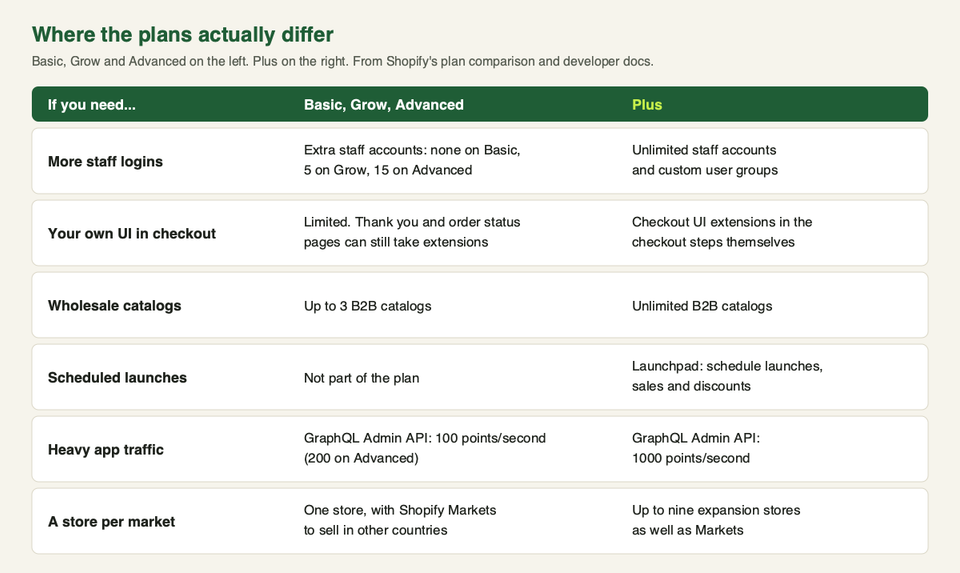
Shopify's plan comparison lists checkout customization as limited on Basic, Grow and Advanced, and full on Plus. Shopify's developer docs show what that means in detail:
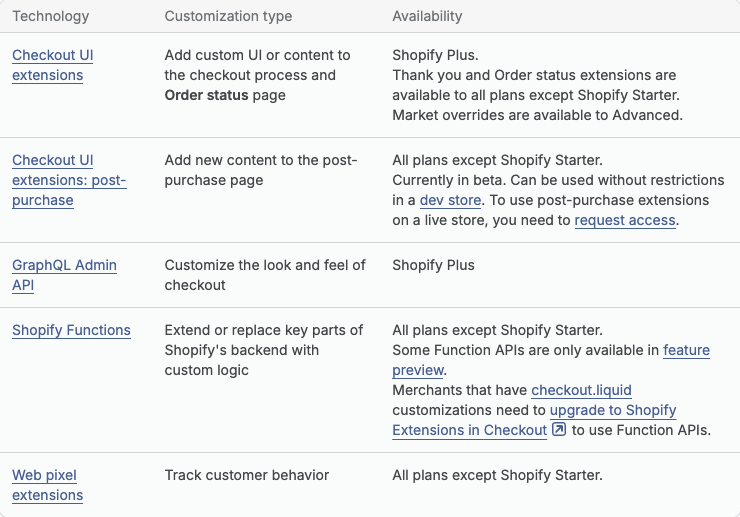
- Checkout UI extensions (custom blocks inside checkout) are available on Plus. Extensions for the Thank you and Order status pages are available on all plans except Shopify Starter. Market overrides are available on Advanced.
- Checkout branding through the GraphQL Admin API (colours, corner radius and similar) is Plus only.
- Shopify Functions (custom logic for discounts, payment options, delivery options and checkout validation) are available on all plans except Starter. There is one catch, covered below.
- Web pixel extensions for tracking are available on all plans except Starter.
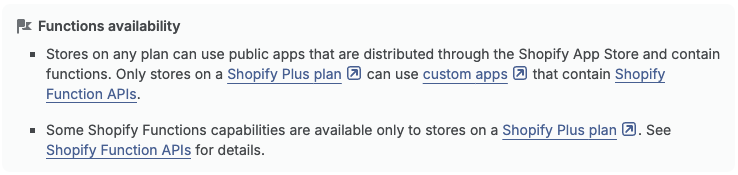
The catch with Functions is also in the docs. Stores on any plan can use public apps from the App Store that contain functions. Only stores on Plus can use custom apps that contain Function APIs. In plain words: a discount app you install from the App Store can run function-based logic on Advanced, but a developer cannot build you a private custom app with that logic unless you are on Plus.
One more fact worth knowing, because it affects every plan. Shopify says checkout.liquid is no longer supported for the Information, Shipping and Payment steps. Shopify also ended checkout.liquid and additional scripts on the Thank you and Order status pages on 28 August 2025. Script tags on those pages ended on 28 August 2025 for Plus stores, and on 26 August 2026 for non-Plus stores. If an old customization is holding up your upgrade, the checkout upgrade report in the Shopify admin is the place to start.
Pick Plus for checkout if you need custom blocks, fields or content inside the checkout steps themselves, or private apps with checkout logic. Skip it if you only need a different discount rule, a payment method rename, or a post-purchase upsell: public apps cover much of that on lower plans.
Automation: Flow and Launchpad
Two tools get mentioned in every Plus pitch.
Shopify Flow is Shopify's workflow automation app. Its listing describes workflow templates, custom logic, unlimited actions and links to tags, metafields, B2B, Slack and Google Sheets. Typical jobs are tagging customers by spend, flagging risky orders and alerting you to low stock. Shopify markets Flow on its Plus pages, but the App Store listing shows it as free and we did not find a "Plus only" note there. Before you count Flow as a reason to upgrade, open the listing from your own store and see what it lets you install.
Launchpad is different. Its listing says it schedules product visibility, themes, discounts and other changes with a start and end time, for sales, drops and flash sales. The listing says it is only available to Shopify Plus customers. Shopify's enterprise upgrade guide also lists Launchpad among the things Plus adds. If your team stays up at midnight to switch a sale on, this one is real.
Pick Plus for automation if you run frequent timed launches across a team and manual switching is a risk. Skip it if you run a few promotions a year: you can schedule those by hand.
B2B and wholesale: it is not only a Plus feature
A common mistake is to think wholesale needs Plus. It does not. Shopify's comparison shows Shopify B2B on every plan, with up to three catalogs on Basic, Grow and Advanced and unlimited catalogs on Plus. Shopify's developer docs describe the building blocks: companies, company locations and contacts, catalogs with negotiated pricing, payment terms and draft orders for approval and invoicing.
Shopify's own upgrade guidance adds that Plus can run different checkout flows for B2B and consumer buyers in one store, for example different payment terms or shipping options for wholesale buyers.
So the question is not "can I sell wholesale?" but "do three catalogs and one shared checkout flow cover my buyers?" If you serve a handful of buyer groups, they probably do. If every large account gets its own pricing and terms, you will hit the limit. For app-based options first, see our guide to Shopify wholesale apps.
Multiple stores and international selling
Plus includes up to nine expansion stores, according to Shopify's enterprise upgrade guide. These are extra stores under the same organization, for new markets or separate locations. The same guide notes that each live expansion store needs its own theme license, and that you still have to create and configure each store yourself.
Do not jump to expansion stores just because you sell in several countries. Shopify Markets, which is on all four plans, lets one store sell in different countries with local currencies and language settings. Advanced adds tailoring by region. Separate stores make sense when markets need different catalogs, legal setups, teams or brands. They also mean more admin work, because each store carries its own data and settings.
Two related limits from the plan comparison: inventory locations (10 on Basic, Grow and Advanced, 200 on Plus) and headless storefronts (1 on the lower plans, 25 on Plus).
Support, staff and partners
Shopify's comparison lists 24/7 support as live chat on Basic and Grow, enhanced live chat on Advanced, and priority support on Plus, which Shopify's pricing page describes as priority 24/7 phone support. Plus also gets access to Shopify's Plus Certified apps and curated service partners.
Staff accounts are a simpler difference. Extra staff accounts are none on Basic, five on Grow, fifteen on Advanced and unlimited on Plus. Plus also adds custom user groups, so you can set permissions once for a whole team. One thing that helps lower plans: inviting third-party collaborators, such as an agency or freelancer, does not count toward your staff account limit.
API limits
If you run several apps, an ERP link or a lot of automation, API capacity matters. Shopify's developer docs give GraphQL Admin API limits by plan, measured in query cost points per second: 100 on Standard plans, 200 on Advanced, 1000 on Plus and 2000 for enterprise customers.
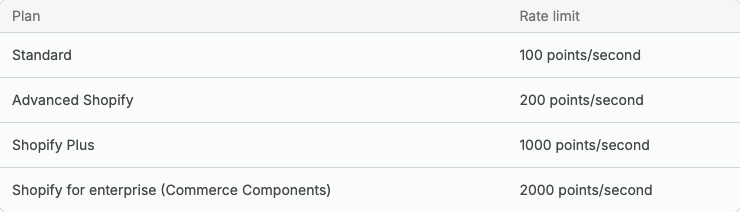
The limit applies to each app and store pair, not to the store as a whole. So a busy store is not blocked just because several apps are connected. A single query is also capped at 1,000 points on any plan. Most stores never notice these limits. Bulk syncs of large catalogs, custom inventory feeds and heavy reporting are where you will.
Shopify's plan comparison page words this difference as a percentage and as a multiple in two places, so use the developer docs for the figure that applies to your API.
Who should stay, and who should move
| Your situation | Our view |
|---|---|
| One brand, one market, a small team, standard checkout | Stay on Basic or Grow |
| Growing, several markets, but nothing is blocked | Stay on Advanced |
| More than 15 people need admin access | Plus is a reasonable move |
| You need custom UI inside checkout steps | Plus |
| Wholesale buyers need more than three catalogs or separate checkout rules | Plus, after checking apps first |
| You run timed drops and flash sales with heavy traffic | Ask about Plus and Launchpad |
| Several brands or regions that need separate stores | Ask about expansion stores |
| You just want "the best plan" | Stay where you are |
Shopify's own guidance agrees on one point worth repeating: there is no universal revenue threshold for Plus. The decision is whether the limits on Advanced cost you more than the extra plan cost, once you count payment rates and the work you do by hand.
Questions to ask before you upgrade
Write these down and get answers in writing from Shopify's Plus sales team.
- What is the full price on a one-year and a three-year term, and how are payment rates set for my store? Our guide on what Shopify takes from each sale explains the usual fee types.
- If I use a third-party payment provider, what extra fee applies, and does it change on Plus?
- Which of my current apps and checkout customizations still work? Shopify says it does not publish one compatibility list, so test each app in a staging store first.
- How many expansion stores do I really need, and do I have the theme licences and staff to run them?
- What do I get in support that I do not get today: a named contact, phone access, response times?
- What checkout capacity is guaranteed? Shopify's pages give different figures for checkout throughput in different places, so ask for the one that applies to your agreement.
- What does the contract say if I want to go back to a lower plan?
A good way to get honest answers is to list the limits that are slowing you down today, send them with your sales numbers, and compare what you get. Shopify's own upgrade guide suggests the same: map the work first, including themes, apps, integrations, checkout changes and data, then pick a low-risk go-live date. If you want a second pair of eyes on that list, talk to us.
Frequently asked questions
Is Shopify Plus just a more expensive Shopify?
It is the same platform with different limits and extras. The headline differences are full checkout customization, unlimited staff accounts and B2B catalogs, expansion stores, Launchpad, higher API limits and priority support. The shop, products and orders work the same way.
Is there a minimum revenue to join Plus?
Shopify's enterprise upgrade guide says there is no universal minimum. Shopify's sales team reviews your situation, and the quote sets the plan fee and payment rates.
Can I run wholesale without Plus?
Yes. Shopify B2B is on every plan, with up to three catalogs on the lower plans. Plus raises that to unlimited catalogs. Wholesale apps can fill gaps before you upgrade.
Can I customize checkout on Advanced?
Partly. Shopify lists checkout customization as limited on Advanced. You can use apps with Shopify Functions, Thank you and Order status extensions, and market overrides. Checkout UI extensions in the checkout steps, and private apps with Function APIs, need Plus.
Do I need Plus to use Shopify Flow?
We could not confirm that on the pages we read. Shopify promotes Flow on its Plus pages, but the App Store listing shows it as free and does not mention a Plus-only rule. Check the listing from inside your own store.
Does Plus make my store faster?
Shopify describes Plus checkout as load-tested for flash sales and offers bot protection and high-volume checkout on that plan. Your storefront speed still depends mostly on your theme and apps, which a plan change does not fix.
How many stores can I have on Plus?
Shopify's guide says up to nine expansion stores. Each live one needs its own theme licence. Confirm the current terms with Shopify, especially if your brands are separate businesses.
Can I move back from Plus to a lower plan?
We did not find this on the pages we read, so we cannot say how it works. Ask for the answer in writing before you sign.