Best Review Apps for Shopify: What to Pick, and the Rules for Using Them
Shopify's own Product Reviews app is gone, so you need an app. Here are seven review apps checked on their App Store listings, how to choose, and the FTC, UK and Google rules that decide whether your reviews help or hurt.

You need a review app to show product reviews on your Shopify store, because Shopify's old Product Reviews app is no longer available. Below you get what Shopify still offers, seven review apps compared on what their own listings say, a way to choose, and the rules on fake, gated and rewarded reviews that matter more than any feature.
The short version: pick on the job you need done, not on the star rating of the app. Any of these apps can collect reviews. What decides whether they help you is whether you ask every buyer, keep negative reviews, label rewards honestly and mark up only what shoppers can see.
What Shopify gives you without an app
Shopify used to ship its own free Product Reviews app. Its App Store page now says the app is not currently available, and a Shopify Community staff reply from September 2023 says it was sunset and delisted on 5 September 2023.

What Shopify does have today is Shop product reviews. Here is what that help page says:
- After someone buys from you through the Shop app or your online store, they get a notification asking for a review. Only Shop customers who bought the product can leave one.
- Reviews are a rating from 1 to 5 stars with an optional comment up to 1,000 characters.
- Reviews and star ratings are public and shown on the product page in the Shop app.
- If you also collect reviews with a supported third-party app, you can display those partner-collected reviews on Shop too, including images and video when they meet Shop's requirements.
We did not find a statement on that page that these reviews appear on your own theme's product pages. So treat it as a bonus channel, not a replacement. For reviews on your store itself you still need an app, or custom work on your theme.
The seven apps we compared
We read each app's Shopify App Store listing. Everything below comes from those listings, not from us installing the apps on a client store. We did not test them for speed or conversion. Plans, limits and features change, so treat the table as a starting point and open the listing before you decide.
| App | Plan on the listing | Photo and video | Google rich snippets | Ways to ask | Import or migration | Languages listed |
|---|---|---|---|---|---|---|
| Judge.me | Free plan | Unlimited visual reviews on the free plan | Google reviews sync and rich snippets on the free plan | Email, SMS, push, forms, QR codes | Imports from Yotpo, Loox, Amazon, Etsy and others | 15 |
| Loox | Free plan, capped by orders | Photo reviews; video listed on a paid plan | Rich snippets and schema on the free plan | Email and reminders, QR codes, pop-ups | Migration and import listed | English |
| Yotpo | Free plan, 50 orders a month | Photos and video on the first paid plan | Rich snippets on the first paid plan | Email requests, social UGC | Review migration listed | English |
| Okendo | Free plan | Photo and video listed | Rich snippets listed | Email, SMS, forms, surveys | Review migration listed | English |
| Stamped | No free plan on the listing | Photo and video listed | Rich snippets listed | Email, SMS, pop-ups | Review migration listed | English |
| Junip | Free plan | Photo and video listed; media requests on a paid plan | Rich snippets on the free plan | Email, SMS, pop-ups, QR codes | Migration from Yotpo, Judge.me, Okendo and others | English |
| Fera | Free trial, no free plan on the listing | Photo and video listed | Rich snippets listed | Email, SMS, QR codes, pop-ups | Etsy, AliExpress and Google reviews | English |
We left prices out on purpose. They change and several of these apps charge by order volume.
Judge.me
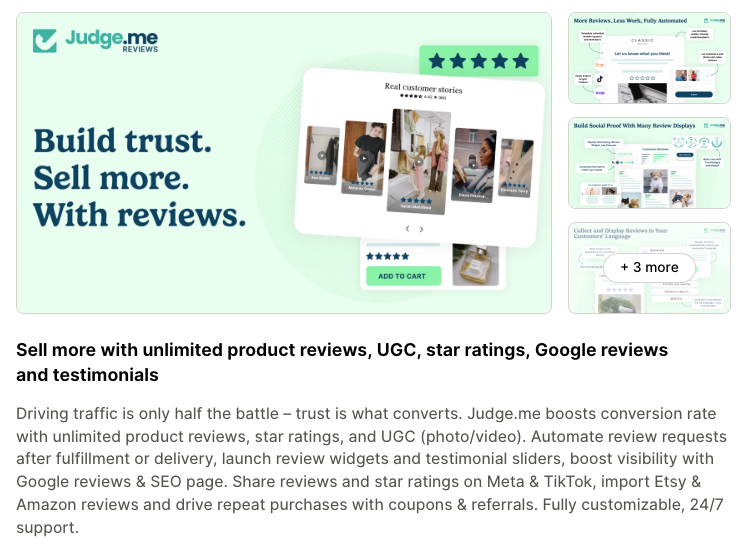
Judge.me's listing puts a lot on the free plan: unlimited product and store reviews, unlimited photo and video reviews, review widgets, carousels, Google reviews sync with rich snippets, and syncing with the Shop app. It also lists imports from other review apps and marketplaces, and 15 languages.
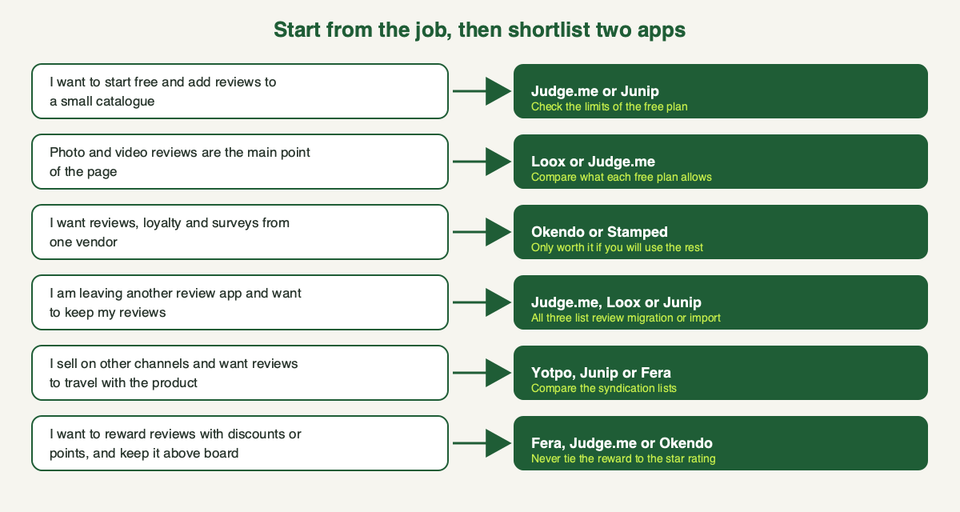
- Pick this if you want to start free, sell in more than one language, or move reviews over from another app.
- Skip this if you want coupons, referrals, automatic reminders, AI features or custom widget CSS without paying. The listing puts those on the paid plan.
Loox
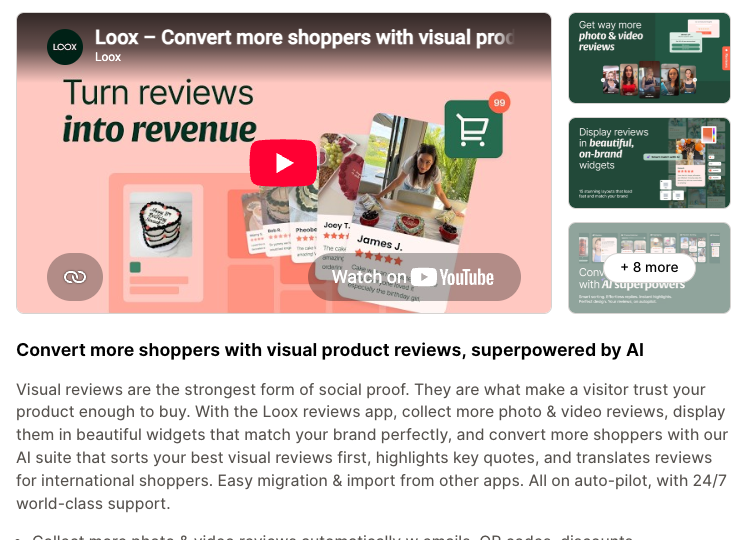
Loox is built around visual reviews. The listing mentions photo and video collection, request emails and reminders, QR codes, discounts for photo reviews, widgets, and syncing reviews to and from the Shop app. It also lists AI sorting, highlights and translations. The first paid plan is where the listing puts video reviews and Google, Meta and TikTok syndication.
- Pick this if pictures and short videos from customers are the main thing you want on the product page.
- Skip this if you need the interface in a language other than English (only English is listed), or you need video reviews without a paid plan.
Yotpo
Yotpo's listing covers automatic review requests, a template library, a sentiment and profanity check, and on-site display on the free plan. Photos and video, Google rich snippets and Google Shopping ads sit on the first paid plan, and Google Seller Ratings on a higher one. It also lists syncing reviews to platforms such as TikTok and Walmart.
- Pick this if you already have steady order volume and want reviews to travel to other channels.
- Skip this if you are small. The free plan is limited to 50 orders a month on the listing. Also read the billing note on the listing: external charges may be billed by Yotpo separately from your Shopify invoice.
Okendo
Okendo is a suite. The listing describes five connected apps for reviews, loyalty, surveys, quizzes and referrals, with integrations for Shop, TikTok, Google, Klaviyo and others.
- Pick this if you will really use loyalty, surveys or quizzes and would rather buy them from one vendor.
- Skip this if you only want reviews. You would be learning a bigger system than the job needs.
Stamped
Stamped's listing covers reviews, ratings, photos, video and Q&A, plus a loyalty program with points, referrals and VIP tiers. It lists connections with Klaviyo, Gorgias and Recharge.
- Pick this if you want reviews and loyalty together and already use one of those connected tools.
- Skip this if you want a free plan, because the listing shows paid plans only. Before you install, read the newest reviews on the listing. At least two merchant reviews from mid-2026 say review requests stopped sending for a while. The vendor replied to one of them. We have not tested it ourselves, so read them and judge.
Junip
Junip's listing leads with unlimited review requests and mobile-first review forms, product page widgets and rich snippets on the free plan. Syndication to Google Shopping, TikTok Shop, the Shop app and Meta Shops is on a higher plan. It also lists migration from Yotpo, Judge.me and Okendo.
- Pick this if you want a lot of request volume without a cap on a free plan, and a simple setup.
- Skip this if you need Google or Shop app syndication without upgrading, or a non-English interface.
Fera
Fera's listing covers automated request emails, photo and video reviews, Q&A, rich snippets, and syncing reviews from Etsy, AliExpress and Google. It also lists rewards for reviews such as discounts, points or cashback.
- Pick this if you sell on Etsy as well and want those reviews in one place, after checking the import rules in the next section.
- Skip this if you want a free plan. The listing shows a free trial, not a free plan.
A different model: Trustpilot
Trustpilot also has a Shopify listing, with a free plan. It is a third-party review platform, so your reviews are also shown on Trustpilot, not only on your store. We left it out of the table because its listing gives less detail on product-level features. If you use any store-level review widget, read Google's rule on store reviews in the next section before you mark them up.
How to choose
Start from the job. Then shortlist two apps and run both on a duplicate theme before you commit.
Before you install any of them:
- Read the plan limits. Orders per month, which features sit behind which plan, and whether billing goes through Shopify.
- Check the language list if you sell outside English-speaking countries.
- Look at the Google options. Rich snippets and Google Shopping syndication are not always on the cheapest plan.
- Check the export route. If you ever leave, can you get your reviews out as a file? Ask before you collect thousands.
- Measure the page. Apps add scripts and widgets. Vendors say their widgets are fast, but that is their claim, not our test. Test with the app on and off, and use the checks in our theme performance guide.
If you want a second pair of eyes on a migration or a theme change, talk to us. Most stores can do this alone.
The rules that matter more than the app
Reviews are covered by consumer law in the US and UK, and Google has its own rules for showing stars. These are the points that affect a normal Shopify store. This is guidance, not legal advice.
Do not fake, gate or buy reviews (US)
The FTC's Consumer Reviews and Testimonials Rule took effect on 21 October 2024. The FTC says it allows courts to impose civil penalties for knowing violations. From the FTC's own Q&A:
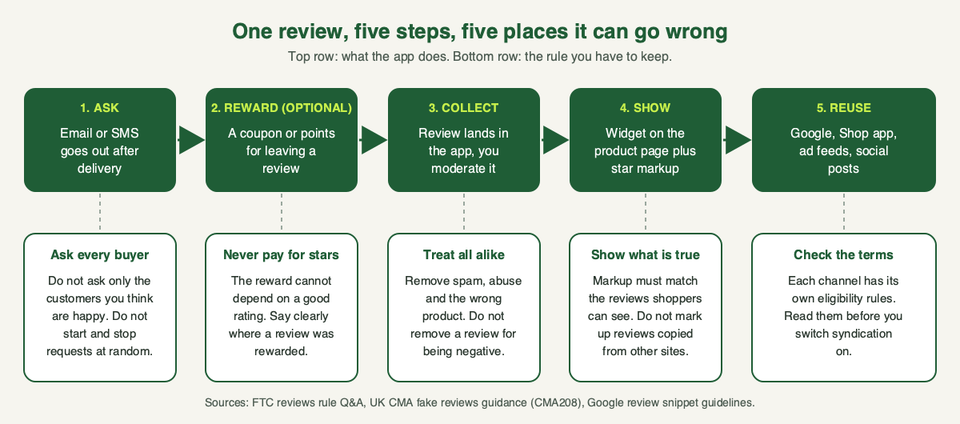
- You can give incentives for reviews, as long as you do not say or imply that the review has to be positive. Offering a coupon for "how much you loved" something is the FTC's own example of implying it.
- You cannot pay for five-star reviews on third-party platforms, even if you ask the reviewer to disclose the incentive.
- If you only host reviews, you are generally not liable for fake ones you did not write or buy. A store that solicits reviews or shows an average rating still counts as hosting. Testimonials you place on your own site are different.
- You cannot use threats, intimidation or groundless legal threats to stop or remove a review. Ordering reviews by "most helpful" is not suppression.
- Asking only the customers you think are happy is not banned by the rule itself, but the FTC says it could still break the FTC Act. The same goes for burying negative reviews so shoppers cannot find them.
- Not disclosing an incentive can also break the FTC Act. Put a clear label where the review shows.
Do not fake, gate or hide reviews (UK)
The UK now has a banned practice for fake reviews and concealed incentivised reviews, which the CMA says came into force in April 2025. The CMA's fake reviews guidance (CMA208) and its reviews and endorsements page say:
- Publishing an incentivised review is not banned on its own, but it must be clearly identifiable as incentivised, usually with a prominent label.
- Traders must not suppress genuine negative reviews or selectively promote positive ones. The guidance lists arbitrarily stopping and starting review invitations as a way of interfering with reviews.
- Traders publishing reviews must take steps to prevent fake reviews and hidden incentives from being published.
The ASA's fake consumer reviews guidance adds two points. Do not incentivise only positive reviews. And moderation that removes genuine, relevant reviews that contain nothing offensive is unlikely to be acceptable.
In practice: send the request to every buyer, reward any honest review the same way, label rewarded reviews, and only remove spam, abuse, or reviews about the wrong product, applying the same rule to positive and negative ones.
Mark up reviews the way Google asks
Google's review snippet guidelines say stars may appear in results when you add valid review or rating markup. They are not guaranteed. The rules that catch stores out:
- The reviews you mark up must be readable by shoppers on that page. If you use an aggregate rating, shoppers must be able to see it.
- Do not aggregate reviews or ratings from other websites.
- Do not include fake or undisclosed incentivised reviews on the page or in the markup. Google's examples include reviews in exchange for money, discounts, vouchers or free products without a clear, prominent disclosure.
- Reviews should be about a specific item, not a category or a list.
- If you show several individual reviews, include an aggregate rating too. Google recommends accepting only ratings that come with a review comment and the author's name.
- For store-level reviews using LocalBusiness or Organization markup: if the business controls reviews about itself, including through an embedded third-party widget, those pages are not eligible for the star review feature. That is the catch with a site-wide review widget.
Two things for your setup. First, your theme and your review app may both output markup, so check what each one sends. Google's Rich Results Test can show you. Second, the import features in several apps, such as Etsy, AliExpress or Amazon, are meant for reviews of your own products. Do not mark up reviews that came from other sites, and check with the vendor before you switch an import on.
For more on markup and other SEO jobs, see our guide to the best Shopify SEO apps.
FAQ
Does Shopify have a built-in product reviews app?
Not any more. The old Product Reviews app is listed as not available, and Shopify staff said it was sunset in September 2023. Shopify does run Shop product reviews inside the Shop app, which can also show reviews from supported partner apps.
Which Shopify review apps have a free plan?
On their listings today: Judge.me, Loox, Yotpo, Okendo and Junip show a free plan, with limits that differ. Stamped and Fera show paid plans or a trial. Open the listing for the current limits.
Can I give a discount for leaving a review?
In the US, yes, if the reward does not depend on a positive review, and you label rewarded reviews. In the UK, incentivised reviews must be clearly identifiable as such, and the ASA warns against rewarding only positive reviews. Never tie a reward to the star rating.
Can I delete negative reviews?
Only spam, abuse, wrong-product reviews and the like, and apply the rule the same way to positive and negative reviews. Removing genuine, relevant negative reviews can break US and UK rules. Replying politely is fine.
Can I ask only happy customers for a review?
Do not. The FTC says it is not banned by the rule itself but could break the FTC Act, and UK guidance treats arbitrarily stopping and starting invitations as interference. Send requests to every buyer.
Will a review app get me stars in Google?
Not on its own. The app can add the markup, but Google says it may show stars, and your markup must follow its guidelines. Use the Rich Results Test on a product page after you install.
Will a review app slow my store?
It adds scripts and widgets, so it can. We have not measured these seven apps. Compare your page with the app on and off, and keep only the widgets you use. Our performance guide shows how.
Can I import reviews from Amazon or AliExpress?
Several apps list it, but check the vendor's terms and the rules above. Reviews should come from real customers of the product you sell. Google also says not to aggregate reviews from other websites in your markup.
Can I switch review apps without losing my reviews?
Often, yes. Judge.me, Loox and Junip list migration or import on their pages, and others list review migration as a feature. Export your reviews to a file first and check the new app's import support before you cancel the old one.
For more options on the free side, see our list of free Shopify apps and our wider ecommerce best practices.