Best Shopify Subscription Apps: What Works Natively and What to Add
How subscriptions work on Shopify today, what checkout and customer accounts support, the payment gateway rule, and eight subscription apps compared on selling plans, portals, failed payments, migration and themes.

Shopify has subscriptions built into checkout, but it does not sell them for you. You need an app to create the plans, run the customer portal and charge each renewal. The plain answer: start with Shopify's own free Subscriptions app if you sell simple "subscribe and save" products on a supported payment gateway, and move to a third-party app when you need bundles, deeper retention tools or help moving existing subscribers.
This guide was. It covers how subscriptions work on Shopify, what checkout and customer accounts do with them, the payment gateway rule that catches many stores out, and eight apps. We read Shopify's docs and each app's own App Store listing. We did not install or load-test these apps, so treat our "pick this if" lines as a reading of the listings, and confirm the details in a demo on your own theme.
How subscriptions work on Shopify today
Shopify models a subscription in layers. Knowing the layers makes every app listing easier to read.
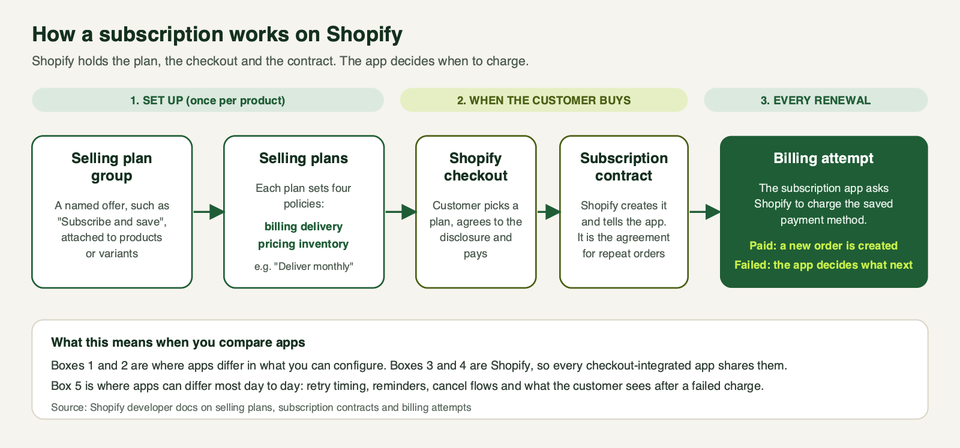
- Selling plan group. A named offer such as "Subscribe and save", attached to products or variants.
- Selling plans. Inside a group, each plan is one way to buy: "Deliver weekly", "Deliver monthly". Every plan sets four policies: billing, delivery, pricing and inventory. Shopify's selling plan docs show this model.
- Checkout. The customer picks a plan and pays in Shopify checkout. Shopify's purchase option principles put checkout at the centre, so apps that follow them share it.
- Subscription contract. After the purchase, Shopify creates a contract and shares it with the app.
- Billing attempt. On each renewal, the app asks Shopify to charge the saved payment method. If it works, a new order is created.
Shopify describes two common shapes. Pay-per-delivery, also called "subscribe and save", charges for each delivery. Prepaid takes one payment upfront and delivers on a schedule until the order is fulfilled.
The useful point for buyers: steps 1 to 4 sit on Shopify's platform, so every app that uses checkout shares them. Apps differ most in step 5 and in what surrounds it: portals, reminders, retries and cancel flows.
One more rule from the same docs: custom apps created in the Shopify admin cannot use subscriptions. A one-store build has to be made in the Dev Dashboard. If you were thinking of a quick private app, that matters.
What checkout and customer accounts support
Shopify's help centre lists the limits that apply to subscription products. The ones that change real decisions:
- Subscriptions are supported on the online store, Shopify POS, Shop and custom storefront channels.
- Subscriptions cannot be used with draft orders.
- Subscription-only products, with no one-time option, can be sold only on the Online Store channel.
- Automatic discounts can apply to subscription orders. Shopify Scripts that discount subscription costs or shipping apply only to the first payment, and so do gift cards.
- The order edits API does not support subscriptions.
- Customers are billed the day after the subscription is due, at 10:00 am in your store's local time.
- Checkout shows the delivery frequency, a first-shipment section and a recurring-payments section, plus a purchase option agreement. On the disclosure text, only Shopify Plus stores can edit the agreement label and consent text. Every plan can edit the cancel text and cancellation instructions, and the disclosure cannot be removed on any plan. If that matters to your legal review, see our guide to Shopify vs Shopify Plus.
For customers, Shopify says subscribers sign in to their customer account to view and manage one-time and subscription purchases. With the first-party app they can resume, skip or cancel, and manage payment methods and shipping address.
Third-party apps have a floor too. Shopify's App Store requirements for purchase option apps say buyers must be able to change their payment method, see all their subscriptions with price and schedule in the customer portal, reach the portal through Shopify's customer account with a single login, and cancel or clearly see how to cancel. So "has a customer portal" does not separate listed apps. What the portal lets people do, and how it looks, does.
The payment gateway rule
This is the part that quietly rules apps in or out. Shopify's help centre says you must use a supported gateway, and that third-party subscription apps work with:
- Shopify Payments
- PayPal Express
- Authorize.net
- Adyen
- Stripe
Availability depends on your region and the gateway's terms. The help page adds several limits worth reading before you choose:
- Shopify Payments supports automatic card updates, which cuts failed payments when cards are replaced. Customers can use accelerated checkouts such as Shop Pay, Apple Pay, Google Pay or PayPal, but on some stores only Shop Pay is available, and Apple Pay support for subscriptions is limited to Visa and Mastercard.
- PayPal Express lets customers use PayPal, but third-party transaction fees are charged if Shopify Payments is not active on the store.
- Authorize.net has PayPal as the only wallet option. Google Pay and Apple Pay are not supported.
- Adyen access to the payment app is limited to organisations with existing Adyen approval, and not every Adyen payment method works for recurring billing.
- Stripe is available only to select merchants.
- Local, manual or non-credit-card payment methods might not be available for subscriptions.
- With a gateway other than Shopify Payments, you may need customers to update expired card details by hand. Shopify advises you to check with your gateway whether card updates arrive automatically.
If you take cash on delivery, bank transfers or a local wallet as your main payment method, check this list before anything else. No app listing will change it.
The free Shopify Subscriptions app
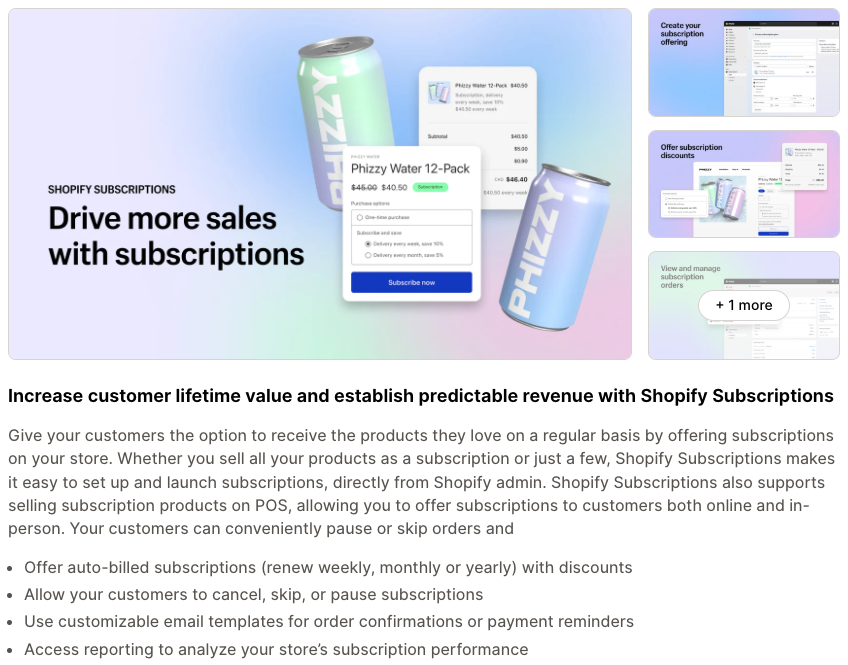
Shopify's own app, listed as Shopify Subscriptions, is the baseline. The help centre says it lets you:
- Create auto-billed subscriptions that renew weekly, monthly or yearly.
- Change, skip, pause and cancel plans and contracts.
- Apply dollar-amount, percentage, buy X get Y or fixed-amount discounts.
- Show a subscription widget on the online store, and subscription details on product, cart and thank-you pages.
- Send email notifications and view analytics on active, paused and cancelled subscriptions.
It also sells on POS, and the listing is marked as free.
Its limits are the reason people look elsewhere:
- Bundles. Shopify's help centre says bundles are not compatible with the app.
- Themes. Your theme must be compatible with sections and blocks. Shopify lists any Online Store 2.0 theme built by Shopify, the Horizon family, Debut from version 15.0 and Brooklyn from version 17.0. If you are on an older or heavily modified theme, see our guide to Online Store 2.0 features and ask your theme developer first.
- Admin access. Staff need a role with the apps and sales channels permission.
- Merchant feedback. Recent reviews on the listing (September and October 2026) ask for things like moving a due date, charging all customers on one fixed date, and editing the products inside a subscription. That is feedback from users, not a confirmed gap list, but it is a useful list of questions to test.
Pick this if: you sell a handful of consumable products, offer a simple discount for subscribing, run on a supported gateway and want everything inside the Shopify admin.
The third-party apps we looked at
These are the apps we opened on their App Store listings. The listings are the vendors' own words, so read the claims as "what they say they do". We have left out prices and review scores because both change often. Check the live listing for plans.
Recharge
Recharge is the oldest app in this group (the listing shows a 2014 launch). Its listing leads with a no-code customer portal for skip, swap and reschedule, churn prevention, automatic recovery of declined cards, bundles, loyalty rewards and cohort analytics. It lists checkout, customer accounts and POS support.
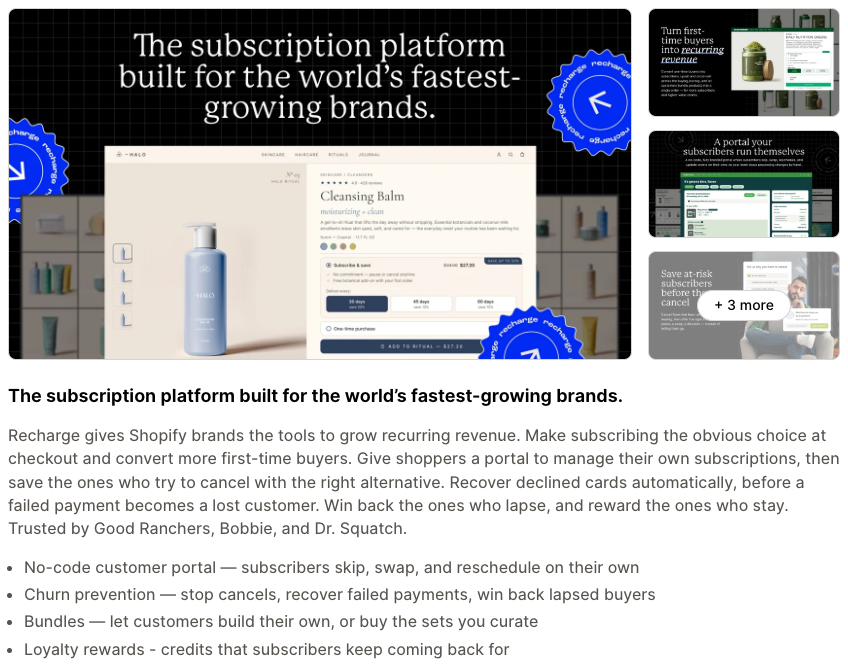
Pick this if: you run a large or fast-growing subscription programme and want one platform for portal, cancel saves and payment recovery. Watch for: its plan table places some features, such as customisable bundles with tiered discounts and a storefront API, on a higher plan, and it shows per-transaction fees alongside the monthly fee. Add those up for your volume before you commit.
Skio
The Skio listing now carries the name "Skio, a Recharge Company". It lists a no-code portal, build-a-box, multi-step cancel flows, automated journeys such as win-backs and upsells, and a migration service that moves subscribers.
Pick this if: you want a retention-heavy setup and a vendor-led migration. Watch for: the two big names now sit under one company on the listing, so do not assume a Recharge-versus-Skio comparison gives you two independent roadmaps. Ask each sales team how they position the products today.
Loop
Loop lists a free plan, a mobile-friendly customer portal, cancel flows, bundles and build-a-box, workflow automation, team permissions, and payment recovery with automatic retries and dunning. Checkout and customer accounts are listed.
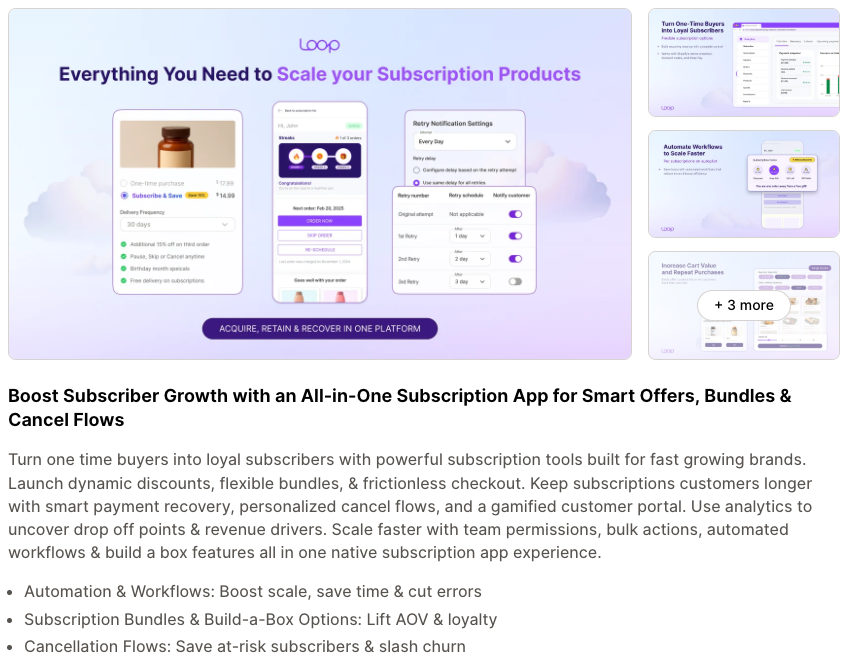
Pick this if: you want strong failed-payment tools and automation, and you like to test on a free tier first. Watch for: the free plan on the listing has a cap on active subscriptions, so it suits a pilot more than a launch.
Appstle
Appstle lists a free plan, pay-as-you-go and prepaid subscriptions, a Shopify-native customer portal, multiple frequencies, payment retry, build-a-box, loyalty features and hands-on migration. Checkout, customer accounts and POS are listed.
Pick this if: you want a wide feature set with a low-risk way in, and you value a vendor that lists migration help on its entry plan. Watch for: breadth means more settings. Test the portal and widget on your theme before launch.
Seal Subscriptions
Seal lists a free plan, classic and prepaid subscriptions, boxes, free trials, memberships, tiered discounts, custom shipping, a passwordless "magic link" portal, and full API and webhook access. The listing says 0% transaction fee across its plans, with plan limits based on subscriber counts.
Pick this if: you sell memberships or boxes, or have a developer who wants API access. Watch for: plan tiers are tied to the number of subscriptions, so check where your growth puts you.
Kaching Subscriptions
Kaching is the newest of this group: the listing shows a 2025 launch. It supports pay-per-delivery and prepaid plans, a portal for pause, skip, swap or cancel, retention offers, payment recovery and retry logic, and analytics. It pairs with the same vendor's bundles app, and the vendor describes the app as compatible with all themes.
Pick this if: you want a simple, focused app that sits alongside bundles and upsells. Watch for: "compatible with all themes" is a vendor claim. A newer app also has a shorter track record, so ask for references at your scale.
Bold Subscriptions
Bold lists prepaid and pay-as-you-go plans, convertible subscriptions, dynamic discounts, cancel flows, automatic dunning management, APIs and a customer portal. It also advertises complimentary white-glove migration from other subscription apps, and lists PayPal Express and Authorize.net among its integrations.
Pick this if: you are moving from another app and want the vendor to do the work, or you have gateway needs beyond cards. Watch for: fees on the listing are a mix of monthly and per-transaction charges. Model them against your volume.
We also opened the listings for Stay AI (retention forecasting and AI analytics) and Smartrr (subscriptions, loyalty and Klaviyo flows). Both are active. We left them out of the table to keep it short, and not because they are weaker.
Side-by-side
| App | Our read: best for | Portal and retention (from its listing) | Migration help (from its listing) | Free plan on listing |
|---|---|---|---|---|
| Shopify Subscriptions | Simple subscribe and save, all in admin | Skip, pause, cancel in customer account; email templates | CSV import of contracts; listing says contracts transfer easily | Free app |
| Recharge | Large programmes needing a full stack | No-code portal, cancel prevention, failed payment recovery | Hands-on implementation listed on a higher plan | Not listed (trial) |
| Skio | Retention and journeys | Portal, multi-step cancel flows, automated journeys | Vendor moves your subscribers | Not listed |
| Loop | Payment recovery and automation | Portal, cancel flows, retries and dunning | Not stated | Yes, capped |
| Appstle | Broad features, low-risk start | Native portal, payment retry, loyalty | Hands-on migration listed | Yes |
| Seal | Memberships, boxes, API users | Magic-link portal, tiered discounts | Not stated | Yes |
| Kaching | Simple setup next to bundles | Portal, retention offers, retry | Not stated | Yes |
| Bold | Moving from another app | Portal, cancel flows, automatic dunning | Free white-glove migration | Trial only |
Failed payments and dunning
Dunning is the process of retrying and chasing a failed renewal. On Shopify it is the app's job, not the platform's. Shopify's billing docs say it is up to apps to attempt re-billing, and give two guardrails: only retry errors that make sense to retry, such as insufficient funds, and avoid re-billing with the same payment method more than 30 times in 35 days, because those requests will be failed and the payment method revoked.
Two more details matter:
- 3D Secure. When a bank challenges a charge, Shopify emails the customer. The success and failure webhooks do not fire until the customer completes the challenge, so an app only knows the outcome after they act.
- Fraud checks. A billing attempt can fail if Shopify's fraud analysis flagged the contract's first order.
When you compare apps, ask these questions, not "does it have dunning":
- How many retries, how far apart, and can we change the schedule?
- Does it vary retries by decline reason?
- What does the customer see, and can we edit the email?
- How does the customer fix a card in one step?
- What happens at the end: skip, pause or cancel?
Your gateway also matters. Shopify Payments supports automatic card updates, which prevents many failures before an app has to retry. With other gateways, you may rely on customers updating cards by hand.
Moving existing subscribers
Migration is the highest-risk part of the project. Here is what Shopify documents.
- Into the free app. You can import contracts from a third-party app with a CSV, but only if that app is integrated with Shopify Checkout. The CSV cannot be larger than 10 MB, the next billing date must be at least 24 hours after import, and an import cannot edit or overwrite an existing contract. Every field is required unless marked optional, and the file needs a payment method ID per contract.
- Payment methods. Shopify's payment migration page describes two routes for a subscription business moving to Shopify: a secondary gateway with the "slow drip" method, or Shopify Professional Services. With slow drip, a customer's card moves to your main gateway when they next update billing details, which can take months or years. Moving card numbers through Professional Services needs a Shopify Plus or Enterprise plan. PayPal billing agreements cannot be moved through that service.
- Gateway-specific limits. In the developer migration guide, Stripe, Braintree, PayPal Express and Authorize.net can connect as secondary gateways. Shopify supports migrating only credit cards from Stripe. From Braintree it supports credit cards and Apple Pay only. Braintree's legacy integration does not support multi-currency subscription contracts.
- Pause old billing. Shopify strongly recommends pausing billing in the old app during the move, to avoid charging a customer twice.
- Do not uninstall early. Shopify's developer docs say that 48 hours after an app is uninstalled, any contracts owned by that app that have not been terminated are cancelled. The help centre words this slightly differently, so treat the safest reading as the rule: uninstall only after the move is finished and checked.
- Bundles. The developer migration guide notes that subscriptions made of bundles of different products are not supported in that flow, so check your own bundle subscriptions early.
Vendors also sell migration as a service. On their listings, Skio, Bold, Appstle and Stay AI all mention migration help in some form. Ask for written scope: which gateway, which payment types, how many contracts, who runs billing during the cut-over, and what happens to subscribers whose cards cannot move.
Theme compatibility
Subscriptions need a widget on the product page, a visible selling plan name in the cart and clear disclosure at checkout. Shopify's theme docs describe how selling plans appear in Liquid, and the UX guidelines cover how plan names and prices should show. The App Store requirement is that the plan name appears in the cart.
What to do about it:
- The free Shopify app needs a sections-and-blocks theme, as above.
- Shopify's migration guide notes that some themes support subscriptions by default, and that any code injection by an app should be optional, so you do not show two widgets.
- If your theme is heavily customised, test the product page, cart drawer, quick-add buttons and any bundle builder. These are the spots worth testing. If you want a second pair of eyes on a custom theme, talk to us.
How to choose
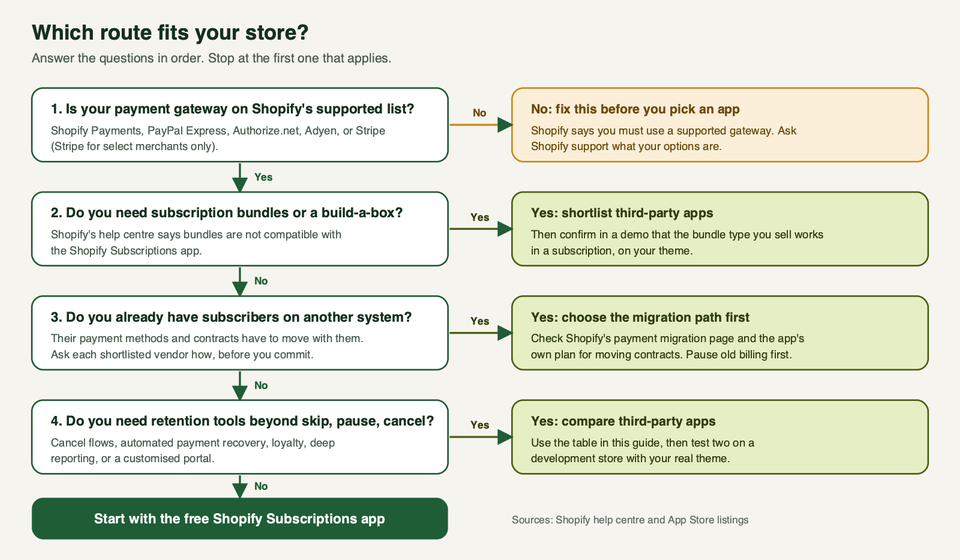
A quick rule set:
- Check the gateway first. If it is not on Shopify's list, nothing else matters.
- Need bundles or build-a-box? The free app is out. Shortlist two or three third-party apps.
- Moving subscribers? Choose the migration path before the app. Ask for the plan in writing.
- Care most about churn? Compare the failed payment settings and cancel flows, not the feature count.
- Still simple? Start with Shopify Subscriptions. You can move later, though moving has its own cost, so decide with growth in mind.
Before you pay for anything, install two shortlisted apps on a development store with your real theme and run one full cycle: sign up, skip, change address, fail a payment, update the card, cancel. If you also sell pre-orders or want upsells at checkout, check those apps still work next to your subscription app.
Questions people ask
Does Shopify have built-in subscriptions?
Part of it. Selling plans, contracts, subscription checkout and customer accounts are part of Shopify. You still need an app to create plans and run renewals. Shopify's own app is free and made by Shopify.
Which payment gateways work with subscriptions?
Shopify's help centre lists Shopify Payments, PayPal Express, Authorize.net, Adyen and Stripe. Stripe is only for select merchants, and availability depends on your region. Local, manual and non-credit-card methods might not be available.
Can customers pay with Apple Pay, Google Pay or PayPal?
It depends on the gateway. With Shopify Payments, accelerated checkouts such as Shop Pay, Apple Pay, Google Pay and PayPal can work, but on some stores only Shop Pay is available, and Apple Pay for subscriptions is limited to Visa and Mastercard. With Authorize.net, PayPal is the only wallet.
Who retries failed payments?
The subscription app. Shopify gives apps the tools and rules, such as not re-billing the same payment method more than 30 times in 35 days. Ask your app how many retries it runs and how the customer updates a card.
Can I use gift cards or discount scripts on subscriptions?
Shopify says gift cards used to pay for subscriptions apply only to the first payment, and Shopify Scripts that change subscription costs or shipping apply only to the first payment. Automatic discounts can apply to each order.
Can I create a subscription from a draft order?
No. Shopify's help centre says subscriptions cannot be used with draft orders, and that the order edits API does not support subscriptions.
What happens if I uninstall a subscription app?
Shopify's developer docs say contracts owned by that app that have not been terminated are cancelled 48 hours after uninstall. Do not uninstall until your subscribers are safely moved.
Will subscriptions work with my theme?
For Shopify's free app, the theme needs to support sections and blocks. Shopify lists Online Store 2.0 themes built by Shopify, Horizon, and recent Debut and Brooklyn versions. For other apps, ask the vendor for a demo on your theme.