Live Chat Apps for Shopify: What to Use in 2026
A plain guide to Shopify live chat, helpdesk and AI agent apps. Shopify Inbox still exists, and we compare eight apps from the App Store and say who each one is for.

You do not need a big helpdesk to answer shoppers on your store, and you do not want a chat widget that wrecks your page speed. This guide explains the three kinds of support tool, then walks through eight apps that are on the Shopify App Store today. The short answer: small store with mostly product questions, start with Shopify Inbox or a free chat plan. Team that handles email, social and refunds, look at a helpdesk.
We checked every app below against its own App Store listing. Plans, features and limits change often, so treat the listing as the final word.

Chat, helpdesk and AI agent: three different jobs
The App Store mixes these up, and so do app names. Here is the difference.
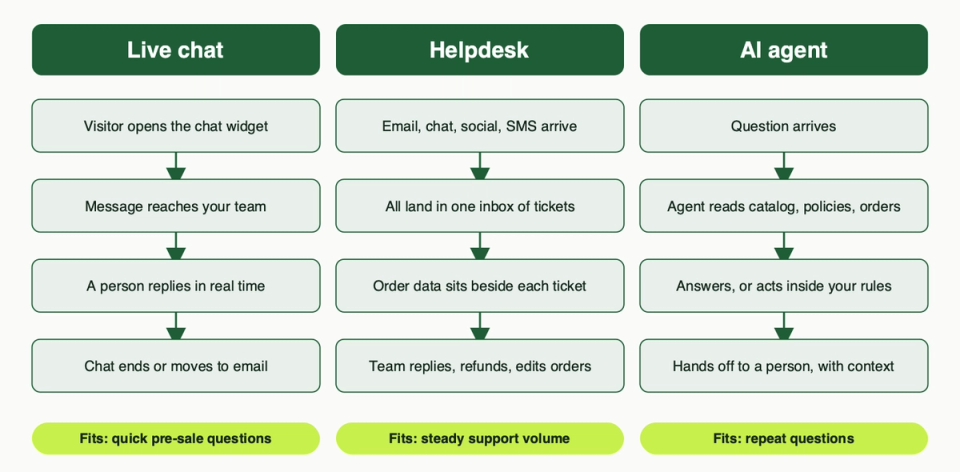
- Live chat is a widget on your store. A shopper types a question and your team answers in real time. It is built for quick, pre-sale questions.
- A helpdesk is a shared inbox. Email, chat, social messages and SMS all become tickets, with order and customer details beside them. It is built for steady support work by a team.
- An AI agent answers for you. It reads your catalog, policies and sometimes order data, replies on its own, and passes the chat to a person when it should. It is built for questions that repeat.
Most apps now bundle two or all three. The question is which one is the centre of the product, because that decides what feels good to use and what feels bolted on.
Does Shopify Inbox still exist?
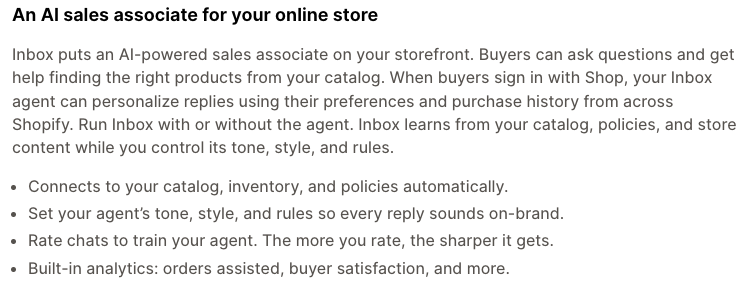
Yes. Shopify Inbox is on the App Store today, published by Shopify, and its listing shows it as free. Shopify's help centre describes it as a way to chat with people who visit your online store. You can answer conversations with your staff, or switch on the Inbox agent.
Two things changed that older articles miss.
- The Inbox agent. The listing now calls Inbox an AI sales associate. Shopify's help page says the agent answers questions about products, shipping, returns, sizing and store policies, using your catalog, policies, knowledge base and published store content. It is opt-in: if you already use Inbox, conversations stay with your staff until you turn it on.
- The Shop app chat is gone. Shopify's changelog says the Inbox inside the Shop app was discontinued from 19 February 2025. Chats that start on your online store are not affected.
Pick Shopify Inbox if: you are a small team, your questions are mostly about products, and you want a first chat tool with no extra vendor.
It does badly at: anything that looks like a ticket system. Shopify's own help page describes chat with staff and the agent, not a multi-channel inbox with rules and macros.
Eight apps compared
"Free" below means what the listing says today.
| App | Centre of the product | Channels named on the listing | Free option on the listing |
|---|---|---|---|
| Shopify Inbox | Chat plus AI sales agent | Store chat, mobile apps | Free app |
| Tidio | Chat plus AI agent (Lyro) | Chat, email, Instagram, WhatsApp | Free plan, free trial |
| Chatty | AI chat plus helpdesk | Chat, WhatsApp, Messenger, Instagram, email | Free plan, free trial |
| Chatway | Chat plus shared inbox | Chat, WhatsApp Business, Messenger, Instagram, email | Free plan, free trial |
| Gorgias | Helpdesk with AI Agent | Email, chat, SMS, social, voice | Free trial |
| Re:amaze | Helpdesk with AI Agent | Email, chat, social, SMS, calls | Free trial |
| Help Scout | Email-style helpdesk | Email, chat, social | Connector listed as free |
| Richpanel | AI-native helpdesk | Email, chat, social, SMS | Free trial |
The apps, one by one
Tidio
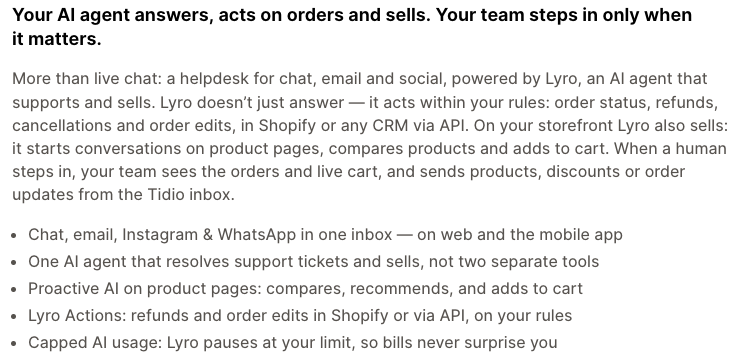
Tidio says it is more than live chat: a helpdesk for chat, email and social, powered by an AI agent called Lyro. The listing says Lyro can handle order status, refunds, cancellations and order edits in Shopify, and on product pages it can start conversations, compare products and add to cart. When a person steps in, the team sees the orders and live cart. The listing also says Lyro pauses at the usage limit you set, which matters if AI is billed per use.
Pick Tidio if: you want chat and an AI agent in one place and may add Instagram or WhatsApp later.
Watch out for: AI usage. Check how AI conversations are counted and what happens at the cap. The listing names six languages, so check yours.
Chatty
Chatty pitches an AI sales agent plus live chat and a helpdesk. The listing says the agent answers product questions, suggests products and helps with order tracking, and that one inbox covers WhatsApp, Messenger, Instagram and email. It also lists a help centre and proactive messages based on visitor behaviour. It carries the Built for Shopify badge on its listing, which we explain in the speed section.
Pick Chatty if: you want an AI-first chat tool with a free plan to test.
Watch out for: the permission list. Its "Data access" section is long and includes editing customers, orders and Online Store pages. Read it and decide if that fits a chat tool.
Chatway
Chatway offers a live chat widget, a shared inbox, WhatsApp and an AI chatbot. The listing says AI agents answer common questions before handing chats to human agents, and that your team can see Shopify cart, order and coupon data from the inbox. There are iOS and Android apps for replying away from a desk.
Pick Chatway if: you want a simple chat and WhatsApp inbox for a small team and care about answering from your phone.
Watch out for: test the WhatsApp connection yourself before you rely on it. We did not, and a listing cannot tell you how reliable it is.
Gorgias
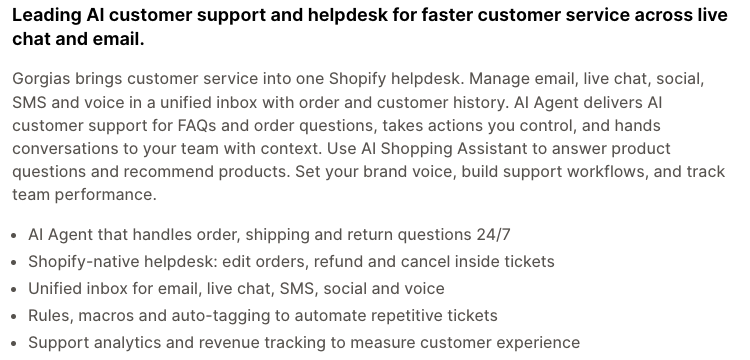
Gorgias is a helpdesk first. The listing describes one inbox for email, live chat, SMS, social and voice, with order and customer history beside each conversation. You can edit orders, refund and cancel inside a ticket. Its AI Agent handles order, shipping and return questions, takes actions you control and hands the conversation to your team with context. A separate AI Shopping Assistant answers product questions.
Pick Gorgias if: support is a real daily job, you handle several channels, and agents need to fix orders without leaving the ticket.
Watch out for: it asks for a lot of customer data, including names, emails, phone numbers, addresses and IP data, according to its data access section. That is normal for a helpdesk, but it belongs in your privacy policy. The listing shows English only.
Re:amaze
Re:amaze is also a helpdesk with chat built in. The listing names email, live chat, social, SMS and calls in one inbox, an AI Agent trained on your knowledge, and the ability to manage, change and create Shopify orders inside support and chats. It adds satisfaction surveys and status pages.
Pick Re:amaze if: you want helpdesk power across several stores or channels and a chat widget in the same tool.
Watch out for: you pay for a helpdesk, so confirm that a small chat-only need does not leave you with features you never open.
Help Scout
Help Scout keeps support feeling like normal email. The listing says your team shares an inbox for email, live chat and social requests, with order details and history beside each conversation, and that agents can edit, duplicate, cancel and refund orders from Help Scout. It also lists AI tools and self-service options.
Pick Help Scout if: your support is mostly email and you want a calm shared inbox with chat as an extra.
Watch out for: the Shopify connector is listed as free, but the Help Scout service is separate, so check what a plan needs. The listing has few reviews, and one recent review says the chat widget (Beacon) could not be installed through the app. That is a single report, so test the install before you commit.
Richpanel
Richpanel calls itself an AI-native helpdesk. The listing says a manager AI studies your tickets and policies and writes the playbooks your AI agents follow. The agents resolve order status, returns, refunds, cancellations and subscription tickets, within guardrails you set such as refund limits, approval rules and when to escalate. A QA agent reviews closed conversations. It claims SOC 2 Type II, HIPAA and GDPR audits; ask for the reports rather than taking the listing's word.
Pick Richpanel if: most of your tickets are repeat order questions and you want the AI to do real work, not just answer FAQs.
Watch out for: AI conversations are billed on usage on the listing, so model the cost at your ticket volume before you switch it on.
What to check before you install
1. Speed cost
A chat widget loads code on your storefront. Some of that runs before the shopper does anything. You cannot judge it from a listing, so measure it.
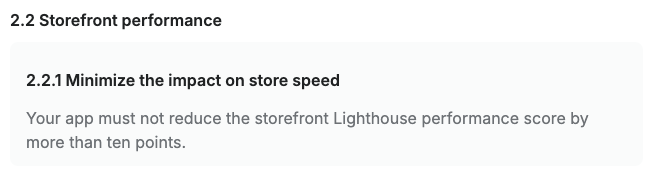
Shopify gives apps one useful yardstick. To earn the Built for Shopify badge, an app must not reduce the storefront Lighthouse performance score by more than ten points (rule 2.2.1 in Shopify's requirements). That is a limit, not a promise of zero cost, and not every app has the badge. Among the apps here, we saw it on Chatty's listing and did not check the others for it.
A fair test takes ten minutes. Run a speed test on your home page, a product page and a collection page. Install the app, run the same tests again, and compare. Repeat on a phone-sized test. If the drop is big, ask the vendor how to load the widget later or only on some pages. Our guide to Shopify theme performance explains what to measure and why script weight matters.
2. Handoff to a human
An AI agent is only safe if a person can take over fast. Ask these things in a trial:
- How does a shopper reach a person? Is it obvious, or hidden behind the bot?
- Does the person see the whole chat, plus the order and cart?
- What happens when nobody is online? Several listings mention business hours or after-hours replies.
- Can you set rules for when the agent must escalate, for example refunds above a limit?
Gorgias, Tidio, Chatway and Richpanel all describe a handoff on their listings. Listing text is a claim. Run a test chat where you try to make the bot fail.
3. Privacy and consent
Chat tools handle names, emails, order details and free text that shoppers type. Three checks:
- Consent. Shopify's Customer Privacy API exposes whether a visitor allows analytics, marketing, preferences and data sharing, and warns that collecting data without consent might not meet the law where you sell. Ask the vendor whether the widget respects the store's consent banner, and ask your lawyer what that means for your markets.
- AI processing. Ask where chat text is sent, how long it is kept, and whether it trains anyone's model.
- Your policy. Name the tool in your privacy policy.
4. Order data access
Every listing has a "Data access" section that shows the permissions the app asks for. Read it. A helpdesk that edits orders needs order access. A pure chat widget needs less. If the permissions go beyond the job, ask why. Also check who on your team will get access to customer data through the tool.
How to choose
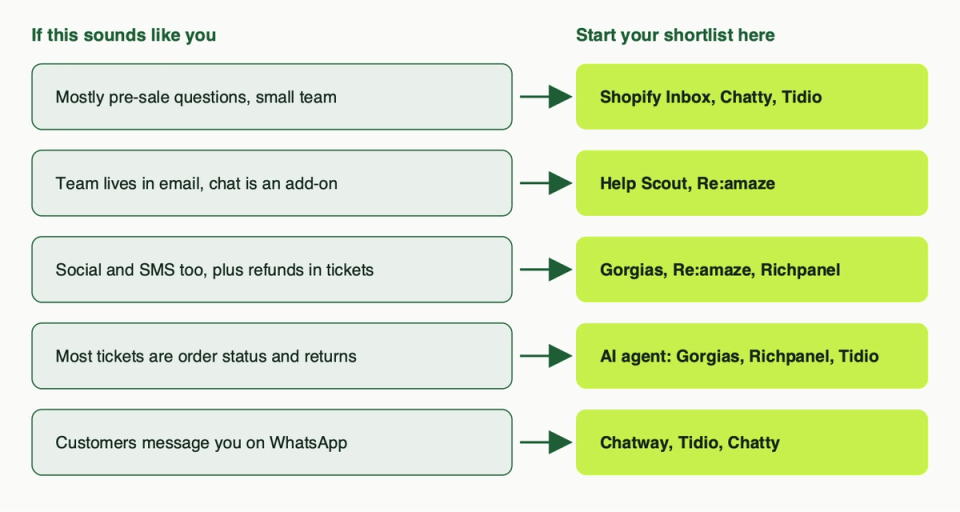
Use the map above to build a shortlist of two. Then run the same trial on both:
- Install on a test setup or a quiet week, not Black Friday.
- Measure speed before and after.
- Ask the AI ten real questions from your inbox, including three it should refuse.
- Hand a chat to a person and see what they see.
- Read the data access list and the vendor's privacy page.
Pick this if:
- You want the lightest start: Shopify Inbox.
- You want AI plus chat and room to add channels: Tidio or Chatty.
- You want a phone-friendly chat and WhatsApp inbox: Chatway.
- You run support as a team across channels: Gorgias or Re:amaze.
- Your support is email first: Help Scout.
- Your tickets are mostly repeat order questions: Richpanel, or the AI Agent in Gorgias.
Chat is a small part of a bigger picture. Fast answers help, but shoppers also judge your store on product pages, shipping and trust signals. Our e-commerce best practices post covers those, and our list of free Shopify apps helps if you are watching costs. If you want help testing speed, wiring an AI agent to your policies, or auditing what an app can read, talk to us.
Questions people ask
Is Shopify Inbox still available?
Yes. It is on the App Store, published by Shopify and listed as free. The Shop app chat was discontinued from 19 February 2025, but chat on your online store continues.
What is the difference between live chat and a helpdesk?
Live chat is a real-time widget on your store. A helpdesk is a shared inbox that turns email, chat, social and SMS into tickets, with order data beside each one. If you only chat with shoppers, live chat is enough. If you also answer email and handle refunds, you want a helpdesk.
Will a chat app slow my store?
It can. A widget adds scripts to your pages. Test your key pages before and after installing. Shopify's Built for Shopify rule allows an app to cost up to ten Lighthouse points, so even a badged app is worth measuring.
Can an AI agent refund orders?
Gorgias, Tidio and Richpanel all say their agents can act on orders, within rules you set. That is a lot of trust. Start with order status only, add refund limits, and require approval above them.
Do I need a cookie banner for a chat widget?
It depends on where you sell and what the widget stores. Check with the vendor whether it follows your store's consent settings, and ask a lawyer. We cannot give legal advice here.
Can I use WhatsApp with Shopify chat apps?
Tidio, Chatty and Chatway name WhatsApp on their listings. Read what each needs to connect, and test it before you tell customers to message you there.
What happens when no one is online?
Set business hours and an after-hours message. Some listings mention business hours or after-hours replies. An AI agent can cover gaps, but give shoppers a clear way to reach a person.
Can I use more than one chat tool?
You can, but two widgets on one page confuse shoppers and add weight. Pick one tool to own the on-site chat and connect the rest through its inbox.