AI Website Builders for Online Stores: What They Do Well, Where They Stop, and When to Use Shopify
AI website builders can draft a store's layout, copy and look in minutes. They do not fix catalog data, tax, shipping, checkout, integrations, speed or accessibility. Here is what each major tool does today, checked from its own pages.

AI website builders turn a short description of your business into a draft site: layout, colours, copy and pictures. For a shop, that draft is useful, but it is only the start of the work. Catalog data, tax, shipping, checkout, integrations, speed and accessibility are still yours to get right. We checked each tool below on its own site, and this guide says what we found, plainly.
What an AI builder actually gives you
Every builder below follows the same pattern. You describe the business, answer a few questions, and the tool produces pages you can edit. Shopify's own roundup of these tools lists the usual features: page layouts and navigation, draft copy, colour and font suggestions, and basic SEO fields such as page titles and meta descriptions. That is a fair summary, and it matches what the vendor pages say.
The useful part is speed. A blank page is slow. A draft you can react to is fast. The risk is that a draft looks finished when it is not.
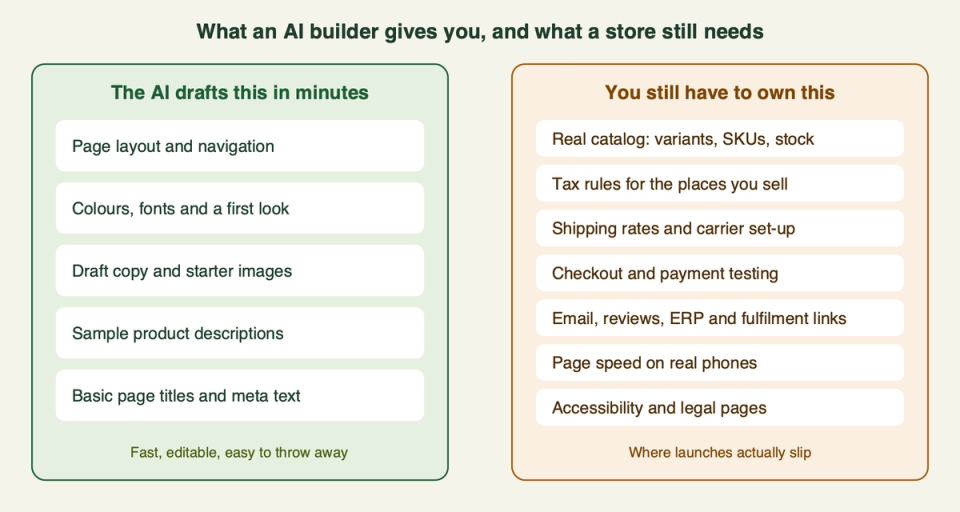
None of the right-hand items is a design problem. They are data, rules and testing. A prompt cannot know your SKUs, your VAT position or your carrier contract. That is why we treat AI output as a draft, and why Shopify's own help pages say the same (more on that below).
The tools
Shopify: AI theme generation and Sidekick
Shopify does two different AI jobs, and people mix them up.
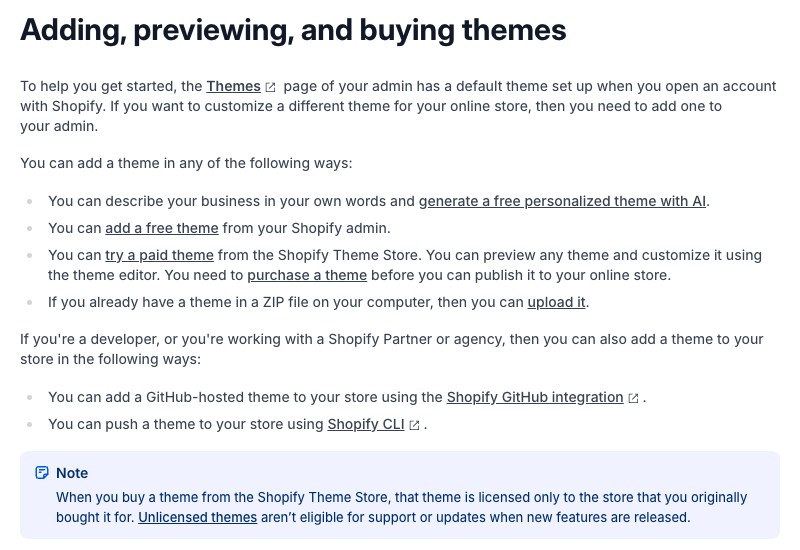
Theme generation. On the Themes page of the admin you describe your business, and Shopify generates up to three free personalised themes to preview. You pick one with "Try theme" and it lands in your draft themes. According to Shopify's help page, this is open during the free trial and on the Basic, Grow and Advanced plans when your storefront is set to English. The Starter plan cannot use it. Shopify's ecommerce builder page describes it the same way and offers hundreds of ready-made themes as the other starting point.
Sidekick. Sidekick is the AI assistant inside the admin. Shopify says you can chat with it for guidance, generate content such as product descriptions, blog posts and store pages, build custom apps, and complete tasks in everyday language. It shows changes for your review before applying them. In the theme editor it can also generate a new theme block from a prompt. We cover it in more depth in our Sidekick guide.
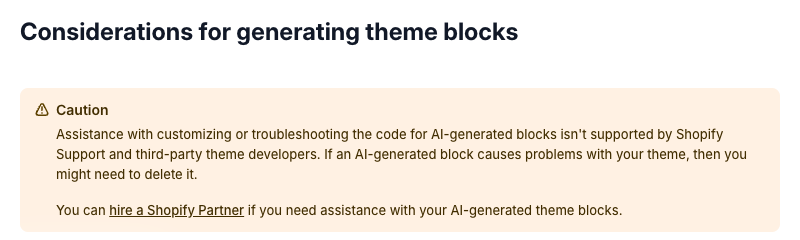
The honest limit sits on Shopify's own help page for generated blocks. It says AI-generated code can produce errors or unexpected results, and may not fully meet accessibility or performance best practices. It also says Shopify Support and third-party theme developers do not support troubleshooting AI-generated blocks, so you may need to delete one that causes problems.
Pick this if you want a real commerce platform underneath and AI as a helper for the first draft and for routine writing. Skip this if you expect one prompt to produce a finished, tuned store. It will not.
Wix: AI website builder and Aria
Wix describes its AI builder as going from a prompt to a "business-ready" site. You can then edit by hand or with Aria, its built-in AI agent. The page shows example requests such as adding a product to the catalog. Wix says you can start building for free, but connecting a custom domain or collecting payments online needs a Premium Plan.

On the store side, Wix's online store page lists product variants, AI-written descriptions, tax and currency settings, store policies, choice of payment methods, delivery options, real-time shipping rates for international orders, and dropshipping support. Its FAQ says AI features include product description writing, SEO and metadata generation, recommendations and a site chat assistant.
One time-sensitive point: Wix's earlier AI tool, ADI, was retired on 10 November 2024, according to Wix's own FAQ. Old tutorials that mention ADI describe a product that is gone.
Pick this if you want a small shop with the store tools in the same product as the builder. Skip this if you plan to grow into many markets, many apps or a large catalog. Check what your catalog and tax setup need before you commit.
Squarespace: Blueprint AI
Squarespace's AI builder is called Blueprint AI. Per Squarespace's own explanation, you answer a few questions about your business and it generates a multi-page site with starter content, imagery and a visual direction. You can choose pages, colours and fonts, then rewrite copy, swap images and rearrange the layout in its Fluid Engine editor.
For selling, Squarespace's ecommerce page lists flat-rate, weight-based and real-time shipping options, tools to calculate sales tax rates automatically, and connections to payment and carrier services.
Pick this if design polish matters most and your range is small. Skip this if your business depends on deep catalog structure or custom checkout logic. We did not find either described on the pages we read.
Hostinger: AI Builder
Hostinger's AI website builder page offers one builder with two modes. Manual mode generates a site from your description and lets you edit it by drag and drop. Agentic mode works by conversation ("vibe coding"), and Hostinger says it suits more complex projects, including large ecommerce stores with user accounts, memberships and subscriptions. It also says source code access is available and that each plan includes a set amount of prompting credits.
For a shop, Hostinger lists physical and digital products, automated shipping and tracking with 40+ carriers.
Pick this if you are comfortable iterating through prompts and want hosting, domain and store in one place. Skip this if you need a proven app ecosystem. A conversation-built store is generated code, and someone has to own it afterwards.
Webflow: AI site builder
Webflow AI can build a site, change page designs, write copy, generate code and run SEO and AEO suggestions. Its AI site builder says it creates a working site plus a design system you can shape.
Webflow's ecommerce page lists customisable product fields, cart and checkout design, and payments through Stripe, Apple Pay, Google Pay and PayPal. It says it can calculate sales tax and VAT automatically for customers in the United States, Canada, the European Union and Australia. If you sell outside those regions, check how tax will work before you build.
Pick this if you are a design-led brand and the shop is one part of a larger site. Skip this if you want a deep app ecosystem for subscriptions, bundles and loyalty out of the box.
Framer: AI agents
Framer's AI page says its agent creates editable pages, sections, copy and visuals in your project, and can work with the CMS. It is a design and publishing tool first. On the pages we read we did not find a built-in cart and checkout. Framer's own update page from April 2023 describes a Lemon Squeezy component for "simple storefronts". If that is still how you would sell, a store is a small add-on, not the core.
Pick this if you want a sharp brand or landing site and will sell a few items through a checkout link. Skip this if you need a real catalog with stock and variants.
Durable
Durable calls itself an AI business builder: a site in seconds, plus CRM, booking, marketing automation and built-in payment processing. Its examples are service businesses such as coaching, cleaning and landscaping. We did not find a product catalog feature on the page we read.
Pick this if you run a service business and want site and customer tools in one place. Skip this if you sell physical products at any scale.
App generators such as Bolt
Tools like Bolt build websites and apps by chat. Bolt's page lists hosting, databases, user authentication, SEO and custom domains. We did not see cart, checkout or tax on the page we read. Building a store this way means you wire those pieces yourself, or connect a commerce backend. That can be a good route for a custom app. It is a heavy route for a normal shop. (We could not open Lovable's site on 17 October, so we say nothing about it.)
Quick comparison
| Tool | What the AI does | Store features named on its own pages | Watch out for |
|---|---|---|---|
| Shopify | Up to 3 themes from a description, Sidekick for content and blocks | Checkout, shipping, inventory, large app store | Generated code is unsupported and needs review |
| Wix | Prompt to site, Aria agent | Variants, tax and currency settings, shipping rates | Payments need a Premium Plan |
| Squarespace | Blueprint AI, multi-page draft | Shipping options, automatic sales tax rates | Check depth for large catalogs |
| Hostinger | Manual and Agentic modes | Physical and digital products, carrier tracking | Agentic output is generated code you own |
| Webflow | AI site builder and design system | Custom cart and checkout, tax for US, CA, EU, AU | Tax coverage outside those regions |
| Framer | AI agent for pages and CMS | Lemon Squeezy component (2023 page) | No built-in cart seen on pages we read |
| Durable | Site plus CRM and booking | Built-in payments | Service-business focus |
| Bolt | Chat-built apps and sites | Hosting, database, auth | Cart, checkout, tax not seen |
Where AI builders stop for a store
This list mixes what vendors say on their own pages (linked) with our own judgement about what a prompt cannot know.
- Catalog data. An AI can write a description. It cannot know that your variant needs a GTIN, that sizes must match across channels, or that your metafields drive filters. That structure is what search, ads and AI shopping assistants read later. See our metafields guide.
- Checkout and payments. Check that your payment methods work in your country and test a real order before launch. Wix says payments need a Premium Plan, and Webflow lists the payment providers it supports. Confirm yours is on the list.
- Tax. Webflow lists the regions it calculates automatically. Squarespace and Wix mention tax tools. None of this replaces advice from an accountant about where you must register.
- Shipping. Rates, zones, carrier accounts and labels are setup work. Builders list the features, but you still define the rules.
- Integrations. Email, reviews, subscriptions, ERP and fulfilment tools are where small stores outgrow a builder. Shopify's page cites 13,000+ apps, and checkout can be extended through UI extensions and Functions.
- Speed. A generated page can be heavy. Test on a real phone. Our theme performance guide shows what to measure.
- Accessibility. Shopify says generated blocks may not fully meet accessibility best practices. Assume the same for any generated page and test it. See our accessibility guide.
When a store should use Shopify instead
Use a Shopify store as the base when any of these is true:
- You will have a growing catalog with variants and clean product data.
- You plan to sell in several countries, currencies or languages.
- You need apps for subscriptions, reviews, bundles, loyalty or B2B.
- You run paid ads or want your products to appear in AI shopping results, where product data quality matters most.
- You want a developer to be able to extend the store later without rebuilding it.
You can still use AI inside Shopify. Generate a theme draft, let Sidekick write descriptions, and keep the platform's checkout, inventory and shipping tools. Our AI for ecommerce guide covers where AI helps most. For a plain walkthrough of the setup steps, see how to set up a Shopify store.
How to choose
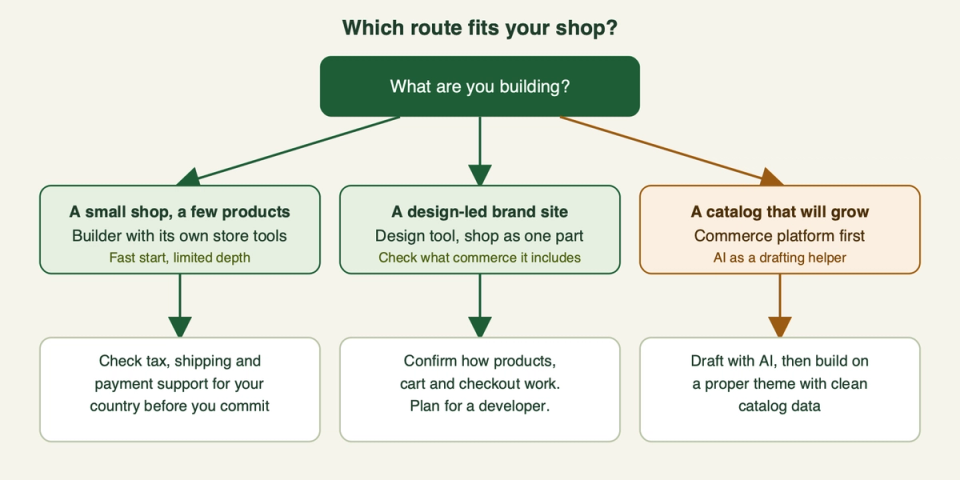
Ask four questions before you pick:
- How many products and variants will you have in a year?
- Which countries will you sell to, and are payments and tax covered there?
- Which apps or systems must connect to the store?
- Who will maintain it in six months?
If you are unsure, build the draft with whichever AI tool you like, then test it against the list above before you pay for anything. If you want an expert to review the draft or plan the build, get in touch. This guide reflects vendor pages as, and these tools change fast, so check the current page before you decide.
Frequently asked questions
Can an AI website builder build a full online store?
It can draft one. The AI produces the layout, copy and a starting catalog. You still enter real products, set tax and shipping, connect payments and test checkout.
Does Shopify have an AI store builder?
Yes. On the Themes page you describe your business and Shopify generates up to three free personalised themes. Availability depends on your plan and storefront language, so check its help page.
Is Shopify Sidekick a website builder?
Not exactly. Sidekick is an assistant in the admin. It helps with guidance, content and tasks, and can generate theme blocks. The theme generator is a separate feature.
Is AI-generated code safe to put on a live store?
Treat it as unreviewed. Shopify says generated blocks can have errors and may not meet accessibility or performance best practices. Test on desktop and mobile, and keep a copy of your theme.
Which AI builder is best for ecommerce?
There is no single winner. For a small shop with simple needs, a builder with its own store tools can be enough. For a catalog that will grow, a commerce platform such as Shopify is the safer base.
Will an AI-built site rank in search?
AI builders create basic page titles and meta text, but ranking depends on content quality, site structure and product data. Review what the tool wrote.
Can I move an AI-built site to Shopify later?
Usually, but plan for it. Check what your current platform lets you export, because product data is the part you most want to carry over. The design will have to be rebuilt in a Shopify theme. It is normally less work to move before the catalog is large.
Do I still need a developer?
For a simple store, maybe not at first. You will want one when you add custom checkout rules, complex catalog structure, integrations, or when speed and accessibility need fixing.